How to Prevent Session Hijacking Across Web and Mobile Apps
How to Prevent Session Hijacking Across Web and Mobile Apps
How to Prevent Session Hijacking Across Web and Mobile Apps
Understand session hijacking prevention, common attack types, detection signals, and technical controls to protect web, mobile, and SaaS sessions.
Author
Team Bureau


See how Bureau has helped industry leaders defend against networked Industrial-scale frauds →
Schedule a Demo
TABLE OF CONTENTS
See Less
Once an attacker gets access to a valid session token, they may not need to break the login flow, bypass MFA, or guess credentials. The application may already trust the session, which is what makes session hijacking so difficult to catch after authentication succeeds.
Session hijacking prevention focuses on protecting the full session lifecycle: how tokens are created, transmitted, stored, rotated, expired, and revoked. Strong session token security also needs real-time monitoring so teams can spot suspicious changes in device, location, behavior, or token usage before a valid session turns into an account takeover.
In this guide, we’ll explain how session hijacking works, the most common attack methods, how to detect suspicious sessions, and how to prevent session hijacking.
What Is Session Hijacking?
Session hijacking is a cyberattack where an attacker takes over a valid user session by stealing, predicting, fixing, or reusing a session token. Once the attacker has that token, the application may treat them as the authenticated user.
For example, if a banking user logs in and an attacker steals the session cookie from the browser, the attacker may be able to access the account without entering the password again.
This is why session hijacking is so risky: the login may already be complete, but the session is no longer under the user’s control.
How Does Session Hijacking Work?
Session hijacking works by abusing the token that an application uses to remember that a user is already authenticated.
A user logs in to a web app, mobile app, or SaaS platform.
The server creates a session ID, cookie, JWT, or authentication token.
The browser or client stores that token and sends it with future requests.
The application uses the token to recognize the user without asking them to log in again.
An attacker steals, intercepts, fixes, or guesses the token through methods like cross-site scripting, insecure transmission, malware, weak cookie settings, or session fixation.
The attacker sends requests using the valid token.
The application may treat the attacker as the real user until the token expires, is revoked, or suspicious activity is detected.
Session tokens work like bearer credentials, which means anyone holding a valid token may be treated as authenticated. Long-lived sessions increase the attack window, and passing session IDs in URLs can expose tokens through browser history, logs, referrers, shared links, and support workflows.
In fact, according to Microsoft's 2025 Digital Defense Report, 80% of MFA-bypass breaches are attributed to session-token theft, meaning attackers are increasingly winning after authentication, not during it.
What Are the Common Types of Session Hijacking Attacks?
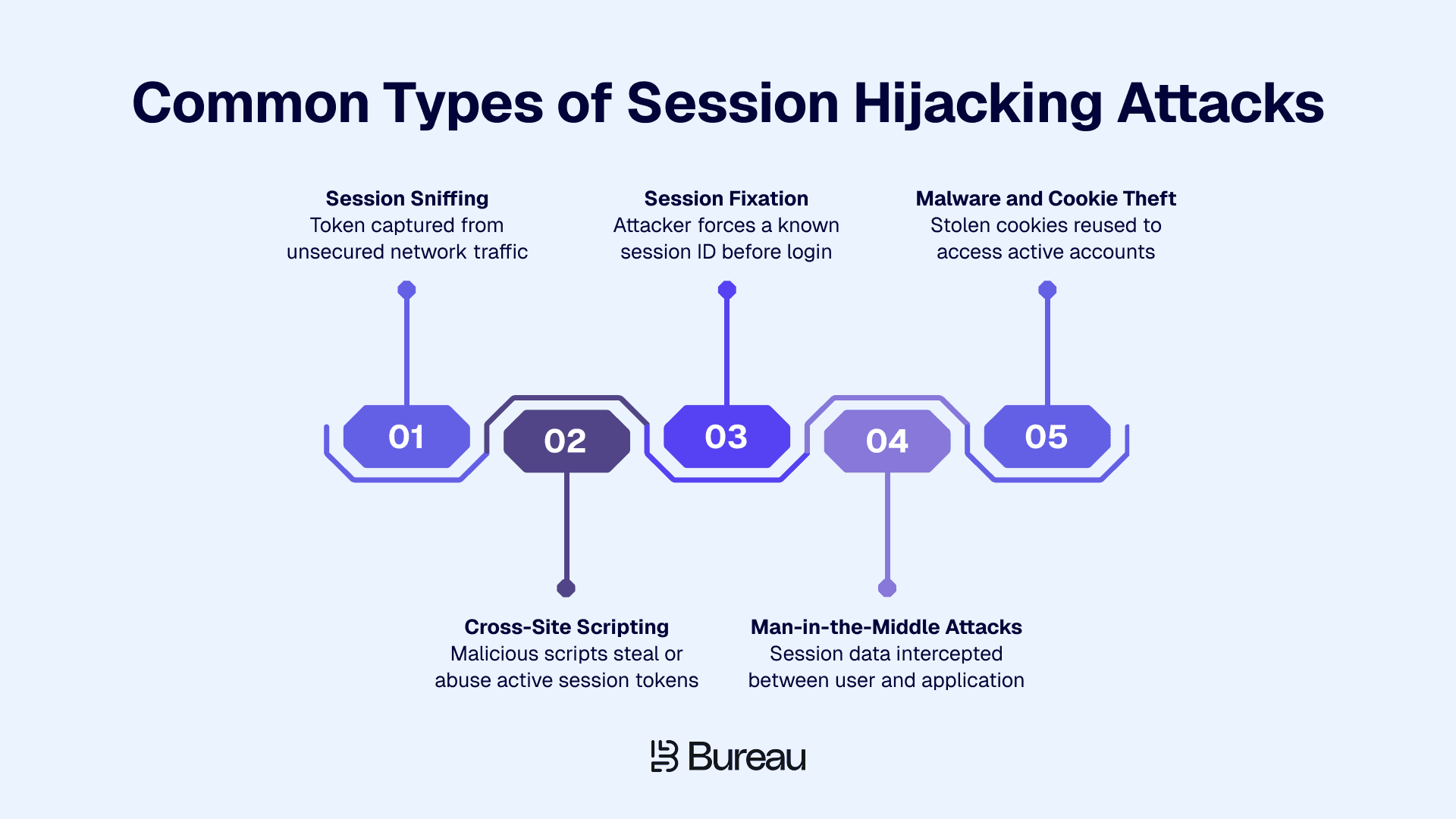
Session hijacking attacks usually target the session token, not the password. Attackers may intercept the token in transit, steal it from the browser, force a known session ID, or reuse cookies taken from a compromised device.
According to the 2026 Fortinet Web Application Security Report, credential stuffing has become the top bot-attack concern for 68% of security professionals, reflecting how rapidly attackers are scaling session abuse tactics and why defenses need to keep pace.
1. Session Sniffing
Session sniffing is when attackers monitor network traffic and capture session data as it moves between the user and the application.
This risk is much higher when a site does not fully enforce HTTPS, especially on public Wi-Fi or insecure networks. Using HTTPS/TLS across the entire application, along with HSTS and Secure cookies, makes session tokens much harder to capture in transit.
2. Cross-Site Scripting
Cross-site scripting allows malicious scripts to run in a user’s browser. If session tokens are accessible to JavaScript, attackers may be able to steal them and reuse them elsewhere.
HttpOnly cookies reduce direct JavaScript access to session cookies, but XSS can still perform actions inside an active authenticated session. Prevention depends on secure coding practices such as:
Input validation
Output encoding
Content Security Policy
Strong session context monitoring after login
3. Session Fixation
Session fixation happens when an attacker forces or tricks a user into authenticating with a session ID that the attacker already knows. If the application does not issue a fresh session ID after login, the attacker may reuse that known session to impersonate the user.
The key control is simple: regenerate session identifiers after trust level changes. That includes:
Login
Privilege changes
Password resets
MFA changes
Account recovery events
4. Man-in-the-Middle Attacks
Man-in-the-middle attacks intercept communication between the user and the application. Weak transport security, missing HSTS, insecure redirects, mixed content, or certificate issues can make session tokens easier to expose.
HTTPS/TLS should be enforced across the entire application, not only on the login page. Secure cookies should never be transmitted over HTTP, and teams should review TLS enforcement, HSTS configuration, and certificate hygiene as part of session hijacking attack prevention.
5. Malware and Cookie Theft
Malware and infostealers can grab cookies or tokens from a compromised device. You can’t fully stop that at the app level, so what matters is what you do after login.
According to IBM's 2025 X-Force Threat Intelligence Index, infostealer malware delivery via phishing surged 84% year-over-year in 2024, with these stealers specifically targeting browser cookies and session tokens.
Watch for red flags like:
New devices
Odd locations
User-agent changes
Unusual behavior
If a trusted account suddenly shows up somewhere risky, that’s a signal. When something looks off, revoke the session or trigger step-up authentication to contain the risk without blocking everyone.
How to Detect Session Hijacking?
Even strong session security cannot eliminate every risk, especially when phishing, malware, or endpoint compromise is involved. Session hijacking detection helps teams identify when a valid session token is being used in a context that no longer looks like the real user.
Technical Warning Signs
Technical indicators usually show up in session logs, authentication events, API activity, and user complaints. The goal is to catch cases where the token is still valid, but the surrounding session behavior looks wrong.
Watch for signals such as:
The same account active from multiple distant locations
Sudden IP address, ASN, or geolocation changes
User-agent changes during an active session
TLS fingerprint changes
Multiple concurrent sessions from unlikely locations
Session reuse after logout
Session reuse after password reset
Sensitive actions immediately after login
API calls that do not match normal user behavior
Unexpected logout complaints from users
For better visibility, log every session creation, rotation, refresh, expiry, and revocation event. Track whether session IDs regenerate after login, privilege changes, password resets, MFA resets, and account recovery events.
Teams should also alert on session reuse after logout or revocation. High-risk endpoints deserve closer monitoring, especially payout changes, password changes, email changes, admin actions, beneficiary updates, and API key creation.
IBM's 2024 Cost of a Data Breach Report found that breaches involving stolen or compromised credentials took an average of 292 days to identify and contain, underscoring why passive session monitoring cannot wait for a user complaint or a failed login to trigger an investigation.
Device, Location, and Behavioral Warning Signs
Some hijacked sessions look technically valid but fail the context test. The token works, but the device, location, or behavior does not match the account’s normal pattern.
Common warning signs include:
A new or suspicious device accessing a known account
Spoofed devices, emulators, VPNs, proxies, or TOR usage
Unusual typing, swiping, or navigation behavior
A sudden change in session rhythm
A trusted account behaving like a first-time user
A sensitive transaction after a device or location change
Multiple accounts linked to the same risky device
A known risky device accessing a previously trusted account
These signals should not automatically block every user. Real users travel, switch devices, change networks, and use privacy tools. The better approach is risk-based response: allow low-risk activity, challenge risky sessions, restrict sensitive actions, or revoke the session when risk is high.
Behavioral biometrics can help here by comparing session behavior such as typing patterns, navigation flow, touchscreen gestures, and interaction rhythm against historical patterns. It allows teams to detect suspicious post-login activity without relying only on static login checks.
Related Read: How Businesses Can Stop AI Identity Fraud With Connected Risk Intelligence
How Does Bureau ID Help Prevent Session Hijacking?
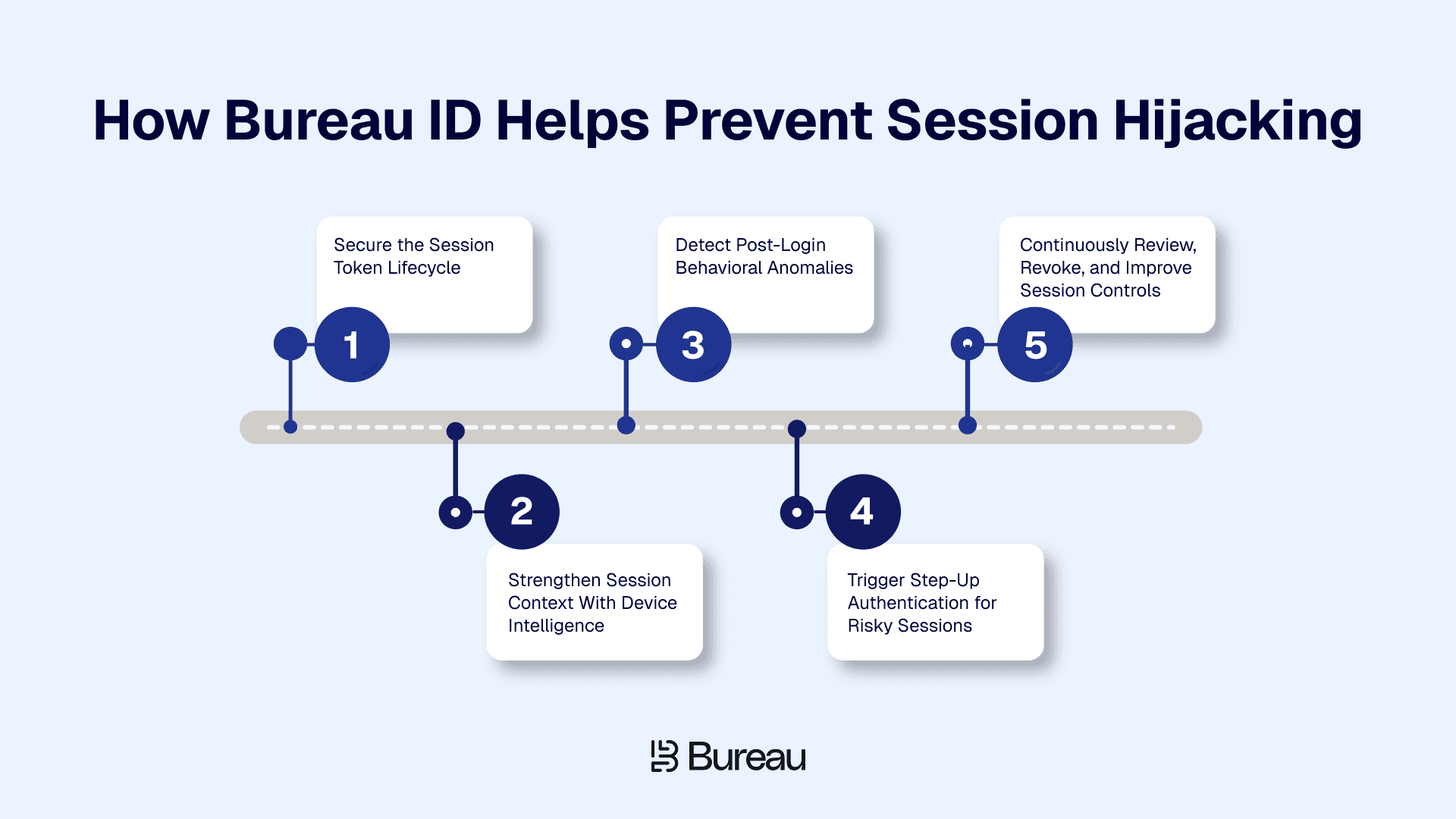
Session hijacking prevention relies on secure session management and continuous risk monitoring.
Bureau ID adds an extra layer by helping teams verify whether an active session still matches the real user through device, identity, and behavioral signals.
Step 1: Secure the Session Token Lifecycle
Start with session token security fundamentals:
Enforce HTTPS/TLS across the application
Use Secure, HttpOnly, and SameSite cookie attributes
Generate strong, random session IDs and rotate them after login or privilege changes
Avoid exposing session IDs in URLs or storing them in localStorage
Set clear session timeouts and revoke tokens after logout or suspicious activity
According to Verizon's 2025 Data Breach Investigations Report, stolen credentials were involved in 32% of all breaches globally, and 88% of basic web application attacks relied on stolen credentials, making token and session security a central control.
For JWT and OAuth flows, use short-lived access tokens, rotate refresh tokens, and always validate signatures and expiry. This reinforces that verifying identity is only part of the equation and that protecting the session that follows is just as important.
Step 2: Strengthen Session Context With Device Intelligence
A valid token should still be checked against device context. Ask questions like:
Is the session coming from a known device?
Has the device changed suddenly?
Are there signs of spoofing, emulators, VPNs, proxies, TOR usage, or device resets?
Bureau ID’s Device ID helps teams identify suspicious access from new, spoofed, or risky devices. Instead of blocking every new device, teams can use device intelligence to trigger step-up authentication when the token is valid but the device context looks risky.
Step 3: Detect Post-Login Behavioral Anomalies
Session hijacking often becomes visible after login because the attacker behaves differently from the real user. Teams should monitor typing speed, mouse movement, touchscreen gestures, navigation behavior, and session rhythm.
For example, a user usually logs in from a known mobile device, checks their balance, and exits. Later, the same account shows a valid session from a new desktop environment, moves directly to payout settings, changes beneficiary details, and attempts a large withdrawal. The token is valid, but the behavior is wrong.
Behavioral biometrics should work as a continuous authentication signal alongside MFA. These signals also support broader account takeover prevention strategies, especially when session activity changes after login.
Step 4: Trigger Step-Up Authentication for Risky Sessions
Strong session hijacking attack prevention should avoid interrupting every user. Step-up verification should trigger when risk increases.
Common triggers include:
New device
High-risk IP
Impossible travel
Suspicious behavior
Token reuse after reset
Account recovery event
Payout or beneficiary change
Password or email change
API key generation
Admin privilege action
Depending on risk, teams can use passkeys, MFA, re-authentication, or additional verification. When possible, restrict only the sensitive action instead of terminating the full session. This helps contain the risk before session hijacking escalates into account takeover, where account takeover protection becomes critical.
Step 5: Continuously Review, Revoke, and Improve Session Controls
Session controls need ongoing review, so log all session creation, refresh, rotation, revocation, and expiry events. Revoke sessions after suspicious activity, password resets, MFA resets, and account recovery events.
Users should also be able to view and terminate active sessions. Confirmed incidents should feed back into risk rules, timeout policies, and response logic.
With a unified risk decisioning platform like Bureau ID, teams can combine device, identity, behavior, and transaction signals into one workflow. That makes it easier to decide whether to allow, challenge, restrict, or terminate a session based on real risk.
Strengthen Your Session Security
When the attacker is already past the login checkpoint, session hijacking prevention depends on two things working together: secure application-layer controls and continuous session risk monitoring.
For security and fraud teams, the next step is to review where session risk can still slip through. That means checking how tokens are generated, stored, rotated, expired, and revoked, then layering in device and behavioral signals to detect when an active session no longer looks like the real user.
Bureau ID helps teams add that post-login risk intelligence layer. By combining device intelligence, behavioral biometrics, identity signals, and transaction context, Bureau ID can help identify suspicious sessions, trigger step-up authentication, restrict risky actions, and reduce account takeover exposure without adding friction to every user.
Book a demo today to see how Bureau ID can strengthen your session risk controls.
FAQs
1. What is session hijacking in simple terms?
Session hijacking is when an attacker takes over a valid user session by stealing or misusing a session token. Once they have the token, the application may treat them as the logged-in user without asking for the password again.
2. How can you prevent session hijacking attacks?
To prevent session hijacking attacks, secure the full session lifecycle. Use HTTPS/TLS, Secure and HttpOnly cookies, SameSite settings, strong session IDs, token rotation, short session expiry, logout-based revocation, XSS protection, MFA, and session anomaly detection.
3. What are the signs of session hijacking?
Common signs include sudden location changes, user-agent changes, multiple active sessions from unlikely places, session reuse after logout, sensitive actions right after login, unusual API calls, unexpected logouts, and device or behavior patterns that do not match the real user.
4. Can MFA stop session hijacking?
MFA helps reduce account compromise, but it may not stop session hijacking if the attacker steals a valid session token after authentication. That is why teams also need secure token handling, session expiry, token revocation, and post-login session monitoring.
5. Can session hijacking happen with JWT tokens?
Yes. JWT tokens can be hijacked if they are stolen, stored insecurely, exposed through XSS, or kept valid for too long. Use short-lived access tokens, refresh token rotation, strict claim validation, secure storage, and revocation controls where possible.
6. Are HttpOnly cookies enough to prevent session hijacking?
HttpOnly cookies help by reducing JavaScript access to session cookies, which limits some XSS-based token theft. But they are not enough alone. Teams still need HTTPS/TLS, SameSite settings, XSS prevention, session rotation, expiry, and anomaly detection.
Once an attacker gets access to a valid session token, they may not need to break the login flow, bypass MFA, or guess credentials. The application may already trust the session, which is what makes session hijacking so difficult to catch after authentication succeeds.
Session hijacking prevention focuses on protecting the full session lifecycle: how tokens are created, transmitted, stored, rotated, expired, and revoked. Strong session token security also needs real-time monitoring so teams can spot suspicious changes in device, location, behavior, or token usage before a valid session turns into an account takeover.
In this guide, we’ll explain how session hijacking works, the most common attack methods, how to detect suspicious sessions, and how to prevent session hijacking.
What Is Session Hijacking?
Session hijacking is a cyberattack where an attacker takes over a valid user session by stealing, predicting, fixing, or reusing a session token. Once the attacker has that token, the application may treat them as the authenticated user.
For example, if a banking user logs in and an attacker steals the session cookie from the browser, the attacker may be able to access the account without entering the password again.
This is why session hijacking is so risky: the login may already be complete, but the session is no longer under the user’s control.
How Does Session Hijacking Work?
Session hijacking works by abusing the token that an application uses to remember that a user is already authenticated.
A user logs in to a web app, mobile app, or SaaS platform.
The server creates a session ID, cookie, JWT, or authentication token.
The browser or client stores that token and sends it with future requests.
The application uses the token to recognize the user without asking them to log in again.
An attacker steals, intercepts, fixes, or guesses the token through methods like cross-site scripting, insecure transmission, malware, weak cookie settings, or session fixation.
The attacker sends requests using the valid token.
The application may treat the attacker as the real user until the token expires, is revoked, or suspicious activity is detected.
Session tokens work like bearer credentials, which means anyone holding a valid token may be treated as authenticated. Long-lived sessions increase the attack window, and passing session IDs in URLs can expose tokens through browser history, logs, referrers, shared links, and support workflows.
In fact, according to Microsoft's 2025 Digital Defense Report, 80% of MFA-bypass breaches are attributed to session-token theft, meaning attackers are increasingly winning after authentication, not during it.
What Are the Common Types of Session Hijacking Attacks?
Session hijacking attacks usually target the session token, not the password. Attackers may intercept the token in transit, steal it from the browser, force a known session ID, or reuse cookies taken from a compromised device.
According to the 2026 Fortinet Web Application Security Report, credential stuffing has become the top bot-attack concern for 68% of security professionals, reflecting how rapidly attackers are scaling session abuse tactics and why defenses need to keep pace.
1. Session Sniffing
Session sniffing is when attackers monitor network traffic and capture session data as it moves between the user and the application.
This risk is much higher when a site does not fully enforce HTTPS, especially on public Wi-Fi or insecure networks. Using HTTPS/TLS across the entire application, along with HSTS and Secure cookies, makes session tokens much harder to capture in transit.
2. Cross-Site Scripting
Cross-site scripting allows malicious scripts to run in a user’s browser. If session tokens are accessible to JavaScript, attackers may be able to steal them and reuse them elsewhere.
HttpOnly cookies reduce direct JavaScript access to session cookies, but XSS can still perform actions inside an active authenticated session. Prevention depends on secure coding practices such as:
Input validation
Output encoding
Content Security Policy
Strong session context monitoring after login
3. Session Fixation
Session fixation happens when an attacker forces or tricks a user into authenticating with a session ID that the attacker already knows. If the application does not issue a fresh session ID after login, the attacker may reuse that known session to impersonate the user.
The key control is simple: regenerate session identifiers after trust level changes. That includes:
Login
Privilege changes
Password resets
MFA changes
Account recovery events
4. Man-in-the-Middle Attacks
Man-in-the-middle attacks intercept communication between the user and the application. Weak transport security, missing HSTS, insecure redirects, mixed content, or certificate issues can make session tokens easier to expose.
HTTPS/TLS should be enforced across the entire application, not only on the login page. Secure cookies should never be transmitted over HTTP, and teams should review TLS enforcement, HSTS configuration, and certificate hygiene as part of session hijacking attack prevention.
5. Malware and Cookie Theft
Malware and infostealers can grab cookies or tokens from a compromised device. You can’t fully stop that at the app level, so what matters is what you do after login.
According to IBM's 2025 X-Force Threat Intelligence Index, infostealer malware delivery via phishing surged 84% year-over-year in 2024, with these stealers specifically targeting browser cookies and session tokens.
Watch for red flags like:
New devices
Odd locations
User-agent changes
Unusual behavior
If a trusted account suddenly shows up somewhere risky, that’s a signal. When something looks off, revoke the session or trigger step-up authentication to contain the risk without blocking everyone.
How to Detect Session Hijacking?
Even strong session security cannot eliminate every risk, especially when phishing, malware, or endpoint compromise is involved. Session hijacking detection helps teams identify when a valid session token is being used in a context that no longer looks like the real user.
Technical Warning Signs
Technical indicators usually show up in session logs, authentication events, API activity, and user complaints. The goal is to catch cases where the token is still valid, but the surrounding session behavior looks wrong.
Watch for signals such as:
The same account active from multiple distant locations
Sudden IP address, ASN, or geolocation changes
User-agent changes during an active session
TLS fingerprint changes
Multiple concurrent sessions from unlikely locations
Session reuse after logout
Session reuse after password reset
Sensitive actions immediately after login
API calls that do not match normal user behavior
Unexpected logout complaints from users
For better visibility, log every session creation, rotation, refresh, expiry, and revocation event. Track whether session IDs regenerate after login, privilege changes, password resets, MFA resets, and account recovery events.
Teams should also alert on session reuse after logout or revocation. High-risk endpoints deserve closer monitoring, especially payout changes, password changes, email changes, admin actions, beneficiary updates, and API key creation.
IBM's 2024 Cost of a Data Breach Report found that breaches involving stolen or compromised credentials took an average of 292 days to identify and contain, underscoring why passive session monitoring cannot wait for a user complaint or a failed login to trigger an investigation.
Device, Location, and Behavioral Warning Signs
Some hijacked sessions look technically valid but fail the context test. The token works, but the device, location, or behavior does not match the account’s normal pattern.
Common warning signs include:
A new or suspicious device accessing a known account
Spoofed devices, emulators, VPNs, proxies, or TOR usage
Unusual typing, swiping, or navigation behavior
A sudden change in session rhythm
A trusted account behaving like a first-time user
A sensitive transaction after a device or location change
Multiple accounts linked to the same risky device
A known risky device accessing a previously trusted account
These signals should not automatically block every user. Real users travel, switch devices, change networks, and use privacy tools. The better approach is risk-based response: allow low-risk activity, challenge risky sessions, restrict sensitive actions, or revoke the session when risk is high.
Behavioral biometrics can help here by comparing session behavior such as typing patterns, navigation flow, touchscreen gestures, and interaction rhythm against historical patterns. It allows teams to detect suspicious post-login activity without relying only on static login checks.
Related Read: How Businesses Can Stop AI Identity Fraud With Connected Risk Intelligence
How Does Bureau ID Help Prevent Session Hijacking?
Session hijacking prevention relies on secure session management and continuous risk monitoring.
Bureau ID adds an extra layer by helping teams verify whether an active session still matches the real user through device, identity, and behavioral signals.
Step 1: Secure the Session Token Lifecycle
Start with session token security fundamentals:
Enforce HTTPS/TLS across the application
Use Secure, HttpOnly, and SameSite cookie attributes
Generate strong, random session IDs and rotate them after login or privilege changes
Avoid exposing session IDs in URLs or storing them in localStorage
Set clear session timeouts and revoke tokens after logout or suspicious activity
According to Verizon's 2025 Data Breach Investigations Report, stolen credentials were involved in 32% of all breaches globally, and 88% of basic web application attacks relied on stolen credentials, making token and session security a central control.
For JWT and OAuth flows, use short-lived access tokens, rotate refresh tokens, and always validate signatures and expiry. This reinforces that verifying identity is only part of the equation and that protecting the session that follows is just as important.
Step 2: Strengthen Session Context With Device Intelligence
A valid token should still be checked against device context. Ask questions like:
Is the session coming from a known device?
Has the device changed suddenly?
Are there signs of spoofing, emulators, VPNs, proxies, TOR usage, or device resets?
Bureau ID’s Device ID helps teams identify suspicious access from new, spoofed, or risky devices. Instead of blocking every new device, teams can use device intelligence to trigger step-up authentication when the token is valid but the device context looks risky.
Step 3: Detect Post-Login Behavioral Anomalies
Session hijacking often becomes visible after login because the attacker behaves differently from the real user. Teams should monitor typing speed, mouse movement, touchscreen gestures, navigation behavior, and session rhythm.
For example, a user usually logs in from a known mobile device, checks their balance, and exits. Later, the same account shows a valid session from a new desktop environment, moves directly to payout settings, changes beneficiary details, and attempts a large withdrawal. The token is valid, but the behavior is wrong.
Behavioral biometrics should work as a continuous authentication signal alongside MFA. These signals also support broader account takeover prevention strategies, especially when session activity changes after login.
Step 4: Trigger Step-Up Authentication for Risky Sessions
Strong session hijacking attack prevention should avoid interrupting every user. Step-up verification should trigger when risk increases.
Common triggers include:
New device
High-risk IP
Impossible travel
Suspicious behavior
Token reuse after reset
Account recovery event
Payout or beneficiary change
Password or email change
API key generation
Admin privilege action
Depending on risk, teams can use passkeys, MFA, re-authentication, or additional verification. When possible, restrict only the sensitive action instead of terminating the full session. This helps contain the risk before session hijacking escalates into account takeover, where account takeover protection becomes critical.
Step 5: Continuously Review, Revoke, and Improve Session Controls
Session controls need ongoing review, so log all session creation, refresh, rotation, revocation, and expiry events. Revoke sessions after suspicious activity, password resets, MFA resets, and account recovery events.
Users should also be able to view and terminate active sessions. Confirmed incidents should feed back into risk rules, timeout policies, and response logic.
With a unified risk decisioning platform like Bureau ID, teams can combine device, identity, behavior, and transaction signals into one workflow. That makes it easier to decide whether to allow, challenge, restrict, or terminate a session based on real risk.
Strengthen Your Session Security
When the attacker is already past the login checkpoint, session hijacking prevention depends on two things working together: secure application-layer controls and continuous session risk monitoring.
For security and fraud teams, the next step is to review where session risk can still slip through. That means checking how tokens are generated, stored, rotated, expired, and revoked, then layering in device and behavioral signals to detect when an active session no longer looks like the real user.
Bureau ID helps teams add that post-login risk intelligence layer. By combining device intelligence, behavioral biometrics, identity signals, and transaction context, Bureau ID can help identify suspicious sessions, trigger step-up authentication, restrict risky actions, and reduce account takeover exposure without adding friction to every user.
Book a demo today to see how Bureau ID can strengthen your session risk controls.
FAQs
1. What is session hijacking in simple terms?
Session hijacking is when an attacker takes over a valid user session by stealing or misusing a session token. Once they have the token, the application may treat them as the logged-in user without asking for the password again.
2. How can you prevent session hijacking attacks?
To prevent session hijacking attacks, secure the full session lifecycle. Use HTTPS/TLS, Secure and HttpOnly cookies, SameSite settings, strong session IDs, token rotation, short session expiry, logout-based revocation, XSS protection, MFA, and session anomaly detection.
3. What are the signs of session hijacking?
Common signs include sudden location changes, user-agent changes, multiple active sessions from unlikely places, session reuse after logout, sensitive actions right after login, unusual API calls, unexpected logouts, and device or behavior patterns that do not match the real user.
4. Can MFA stop session hijacking?
MFA helps reduce account compromise, but it may not stop session hijacking if the attacker steals a valid session token after authentication. That is why teams also need secure token handling, session expiry, token revocation, and post-login session monitoring.
5. Can session hijacking happen with JWT tokens?
Yes. JWT tokens can be hijacked if they are stolen, stored insecurely, exposed through XSS, or kept valid for too long. Use short-lived access tokens, refresh token rotation, strict claim validation, secure storage, and revocation controls where possible.
6. Are HttpOnly cookies enough to prevent session hijacking?
HttpOnly cookies help by reducing JavaScript access to session cookies, which limits some XSS-based token theft. But they are not enough alone. Teams still need HTTPS/TLS, SameSite settings, XSS prevention, session rotation, expiry, and anomaly detection.
TABLE OF CONTENTS
See More
Recommended Blogs


Landing Page.
Simple, bold.
Sign Up
Download

Products
Solutions


© 2026 Bureau . All rights reserved.
Solutions
Industries
Resources
Company
Solutions
Industries
Resources
Company
© 2026 Bureau . All rights reserved.
Follow Us
Leave behind fragmented tools. Stop fraud rings, cut false declines, and deliver secure digital journeys at scale
Our Presence








Leave behind fragmented tools. Stop fraud rings, cut false declines, and deliver secure digital journeys at scale
Our Presence
© 2026 Bureau . All rights reserved.