How to Secure Mobile Apps Across Development and Runtime
How to Secure Mobile Apps Across Development and Runtime
How to Secure Mobile Apps Across Development and Runtime
Understand mobile app security, common threats, testing methods, OWASP guidance, app hardening, and runtime protection for Android and iOS apps.
Author
Team Bureau

See how Bureau has helped industry leaders defend against networked Industrial-scale frauds →
Schedule a Demo
TABLE OF CONTENTS
See Less
An attacker does not always need to break the app to compromise what it does. On a manipulated device, they can change what the app sees, what the user sees, or what gets sent to the backend. The code may remain unchanged, and the session may still look valid, but the outcome can be very different from what the business intended.
That changes the whole security problem after release. Secure coding and pre-release testing can reduce weaknesses in the application itself, but they cannot control the environment where the app eventually runs.
For businesses handling payments, identities, or account access, mobile app security must protect more than the code that ships. It must account for what happens when the app is running in conditions the business no longer controls.
How Mobile App Security Changes Across the App Lifecycle
Mobile app security covers the controls that protect an application from the moment it is designed through the time it is running on a user’s device.
The risks change at each stage. During development, teams can review code, test dependencies, and fix weaknesses before release. After release, the focus shifts to detecting and responding to threats that appear while the app is in use.
Security therefore has to change as the risks around the app change:
Secure design identifies what needs protection before development begins. Teams map sensitive data, likely abuse scenarios, and the controls needed to reduce those risks. Sensitive decisions such as authorization and transaction validation should stay on the server rather than depend on logic inside the app.
Secure development turns those decisions into code. The focus is on reducing vulnerabilities, protecting sensitive functions, and limiting what APIs expose to the mobile client.
Security testing looks for weaknesses before release. This includes issues in the code, third-party components, Application Programming Interfaces (APIs), and the way the app behaves during testing.
Application hardening makes the released app harder to inspect, copy, or alter. Techniques such as code obfuscation and integrity checks can make reverse engineering and tampering more difficult.
Runtime protection focuses on what happens after the app starts running. It can detect attempts to interfere with the app, inject code, or run it in a compromised environment.
Continuous monitoring shows what is happening in production. Those findings should feed back into patches, security rules, test cases, and future releases rather than remain isolated as production incidents.
Version management closes another common gap. Fixing a vulnerability does not remove the risk if users can continue running an insecure release, so teams need to track supported versions and retire builds that can no longer be protected safely.
Frameworks such as the Mobile Application Security Verification Standard (MASVS) from the Open Worldwide Application Security Project (OWASP) can help teams assess whether controls remain effective across authentication, data storage, network communication, privacy, and resilience.
Mobile app security is also different from mobile device security. While device security protects the operating system and the device itself, app security protects how the application runs, handles data, and responds when the environment around it changes.
A secure device can reduce some risk, but the application still needs its own protection. If the app cannot recognize when its behavior has been altered, controls that worked during development may no longer work as intended in production.
How Common Mobile App Security Risks Turn Into Attacks

Mobile attacks often start with one weakness and expand from there. An exposed token can reveal an API, weak session controls can keep an attacker inside after login, and reverse engineering can show them how sensitive parts of the app work and where they may be vulnerable.
Before looking at those attack paths in detail, three terms are worth separating:
A vulnerability is a weakness in code, design, configuration, or architecture.
A threat is the actor, malware, tool, or attack method capable of exploiting that weakness.
Risk reflects how likely that exploitation is and what the business stands to lose if it succeeds.
Most mobile app attacks can be traced back to five recurring areas of weakness:
1. Data, Authentication, and API Security Risks
Some of the most damaging weaknesses are invisible to the user. Exposed credentials, tokens, encryption keys, or transaction data can give attackers an opening, while weak authentication and session controls can extend that access.
APIs create another route. If sensitive actions can be triggered directly through backend endpoints, an attacker may bypass checks built into the app.
An Akamai study found that 96% of surveyed financial institutions had experienced an API-related security incident in the previous year, while 40% reported API-related data breaches or leaks. This means weak API controls can expose far more than the mobile interface itself.
Sensitive actions and business rules should therefore be validated on the server rather than trusted to the mobile app.
2. Reverse Engineering, Tampering, and Code Manipulation
Once a mobile app is distributed, attackers can inspect its Android Application Package (APK) or iOS binary to understand how it works. This can expose API endpoints, embedded secrets, and security logic.
Attackers may:
Modify or repackage the app
Remove restrictions
Inject code
Hook functions
Alter runtime behavior
This is why released apps need barriers against tampering even after they have passed security testing. A 2025 peer-reviewed study found that 24.1% of the Android apps examined had implemented fewer than half of the app-hardening techniques assessed, and only 26 apps implemented all eight techniques. That leaves many apps with fewer barriers between inspection and manipulation.
3. Compromised Devices and Hostile Runtime Environments
A secure app can still behave differently when the device beneath it has been compromised. Rooted or jailbroken devices can remove protections the operating system normally provides. Emulators, app clones, device masking, and GPS spoofing can also make a suspicious device appear legitimate.
Attackers can use that access to interfere with the app while it is running or automate activity across large numbers of devices. Mobile app protection therefore needs visibility into the environment where the application is actually executing.
4. Network, Session, and User Interface Attacks
An attacker does not always need to compromise the app itself. They can use Weak Transport Layer Security (TLS) settings or poor certificate validation to intercept or alter communications between the app and its backend systems. Stolen sessions and session hijacking can also let them continue as an authenticated user without logging in again.
The screen itself can become part of the attack. For example, an overlay can place a fake interface over a legitimate app and trick a user into entering information or approving an action. This is why protecting the network connection alone does not protect everything that happens during a mobile session.
5. Third-Party Components and Software Supply Chain Risks
An app also inherits risk from code the development team did not write. Libraries, Software Development Kits (SDKs), frameworks, and external services may contain vulnerabilities or request more access than they need.
A weakness in any one of the components can become a weakness in the application, even when the first-party code is secure. Teams therefore need to know which third-party dependencies are in each release, and whether they remain safe to use.
Taken together, these risks show how one weakness can open the door to another. An attacker who gains access through a compromised device, exposed API, or weak session can use that foothold to tamper with the app, steal data, or carry out fraudulent actions.
What Types of Mobile App Security Testing Should Teams Use?
No single testing method can see the entire mobile attack surface. Some methods examine code before execution, others test the app while it runs, and manual assessments look for attack paths automated tools may miss.
Teams need several methods because each answers a different security question.
Method | How It Works | What It Helps Find | When It Is Used |
Static Application Security Testing (SAST) | Examines source code, bytecode, or binaries without running the app | Insecure coding patterns, hardcoded secrets, unsafe Application Programming Interfaces (APIs), cryptographic misuse, and validation issues | During development and builds |
Dynamic Application Security Testing (DAST) | Tests the application while it is running | Weaknesses in authentication, session handling, network communication, and exposed functionality that may not appear in static analysis | Against production-like builds in realistic test environments |
Software Composition Analysis (SCA) | Identifies open-source libraries, Software Development Kits (SDKs), and other third-party components used by the app | Known vulnerabilities, outdated packages, and risky dependencies | During development and Continuous Integration/Continuous Delivery (CI/CD) |
Interactive Application Security Testing (IAST) | Monitors the application inside an instrumented test environment and connects runtime activity to the underlying code | Runtime weaknesses and the specific code paths responsible for them | During instrumented testing |
Penetration testing | Tests the app from an adversarial perspective using techniques such as reverse engineering, API abuse, network interception, and business-logic manipulation | Exploitable attack paths and combinations of weaknesses that automated tools may miss | At planned assessment intervals and before high-risk releases |
These methods are complementary rather than interchangeable. SAST may catch a hardcoded secret, while DAST may expose weak session handling. SCA can flag a vulnerable dependency, IAST can trace a runtime issue back to its source, and penetration testing can show how separate weaknesses combine into a practical attack path.
Preventive Measures and Best Practices for Mobile App Security
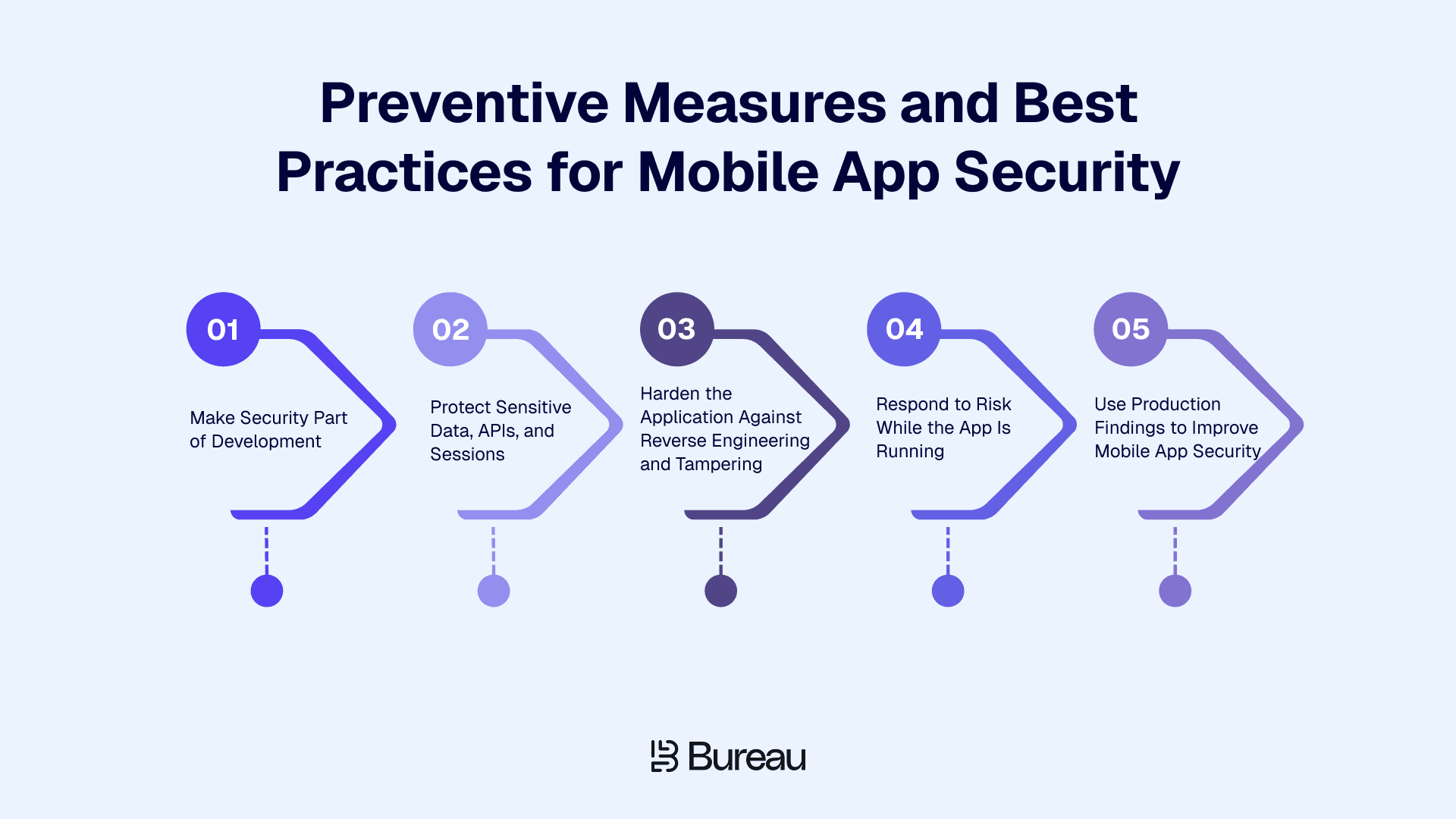
Effective mobile app security depends on several controls working together across development and production. The aim is to prevent weaknesses early, limit the damage when attackers find them, and detect threats that appear only after deployment.
Five practices help reduce risk across the application lifecycle:
1. Make Security Part of Development
Security decisions should be made while the app is being designed and built. Threat modeling can identify where sensitive data or high-risk actions need stronger protection, while secure coding standards give developers clear requirements to follow.
Build security checks into the development workflow. Code reviews and automated testing can catch issues before they move further into production, with clear ownership for fixing what those checks uncover.
2. Protect Sensitive Data, APIs, and Sessions
Every piece of sensitive data stored on a device gives an attacker something worth targeting. Apps can keep that footprint as small as possible. Credentials and tokens belong in the secure storage provided by Android or iOS, while sensitive data needs protection both when stored and when transmitted.
A successful login does not create unlimited access, because sessions need clear expiry and revocation rules. Actions such as changing account details, resetting credentials, or approving a high-risk transaction may also require the user to authenticate again.
Backend APIs should assume that the mobile client can be manipulated. Validate requests on the server, and check authorization before any sensitive action is completed. Keep business rules on the server so altering the app does not give an attacker control over the decision itself.
3. Harden the Application Against Reverse Engineering and Tampering
Once an app is distributed, attackers can download the same binary as legitimate users and study it at their own pace. Hardening makes that process slower and unauthorized changes easier to detect. For instance:
Code obfuscation can make application logic harder to understand.
Anti-debugging and integrity checks can reveal attempts to inspect or alter the app.
Clone detection can identify repackaged versions.
4. Respond to Risk While the App Is Running
After release, teams also need to know when the conditions around the app could change how it behaves. A rooted device, emulator, injected code, or malicious overlay can turn an otherwise legitimate session into a higher-risk one.
Runtime controls should connect those signals to a response. A lower-risk event may only need to be recorded, and an attempt to interfere with a sensitive action may justify restricting the action or blocking the session.
The response should match the risk level, because treating every anomaly the same can create unnecessary friction, while failing to act on high-risk signals leaves the application exposed.
5. Use Production Findings to Improve Mobile App Security
Finding a vulnerability has little value if it remains open long enough to be exploited. Teams should:
Retest after significant releases.
Keep third-party components updated.
Patch confirmed vulnerabilities.
Monitor whether older app versions remain in use.
Production findings should also become new test cases or security rules so the same weakness is less likely to return in a future release.
Track measures that show whether security issues are actually being resolved, such as:
The time taken to fix critical vulnerabilities
The share of users on unsupported app versions
Repeated tampering attempts
False-positive rates
The time between detecting a high-risk event and responding to it
The gap between detection and remediation can be significant. Verizon's 2026 DBIR found that only 26% of critical known-exploited vulnerabilities were fully remediated during 2025. For security teams, this implies identifying a weakness is only the first step. Someone still needs to own the fix, prioritize it, and verify that the exposure has actually been removed.
Where Runtime Application Self-Protection Fits
Testing can show how an application behaves before release, but Runtime Application Self-Protection (RASP) addresses a different question: "What should happen when the deployed app detects that its execution is being interfered with?"
RASP works inside the application while it is running. Depending on the risk and the policy set by the business, it can detect suspicious conditions, such as a rooted or jailbroken device, app tampering, code injection, or attempts to hook into the app, and trigger an appropriate response. That may mean:
Recording the event
Warning the user
Restricting a sensitive action
Blocking the session
This matters because some problems only appear during execution. For example, a 2025 study of 3,885 Android apps found runtime exposure of personally identifiable information (PII) in 233 applications, accounting for 7,485 privacy violations. The study shows why some issues only become visible while an app is running.
RASP adds protection at that point. It gives the application a way to recognize suspicious runtime conditions and respond while the activity is still happening, rather than waiting for the issue to surface later through logs, fraud losses, or an investigation.
Related Read: RASP Security: How It Works, Threats, and Implementation
How Bureau Protects Mobile Apps With RASP
Bureau’s Runtime Application Self-Protection (RASP) checks the application while it is running and evaluates whether the app, device, and network can be trusted.
Its four-layer zero trust model also applies policy controls that determine how the app responds when risk is detected.
Application trust: Bureau checks whether the app has been inspected, modified, repackaged, or interfered with. Its custom virtualization technology converts selected application logic into a private instruction format, making it harder to analyze with standard reverse-engineering tools.
The example below shows the shift from readable application logic to protected bytecode.

Bureau XVM compiler converting readable application logic into proprietary bytecode inside a hardened virtual machine container.
Device trust: Bureau can identify conditions such as rooting, jailbreaking, emulation, cloning, or attempts to manipulate the runtime environment.
The example below shows how device signals can distinguish a physical Android device from an emulator.
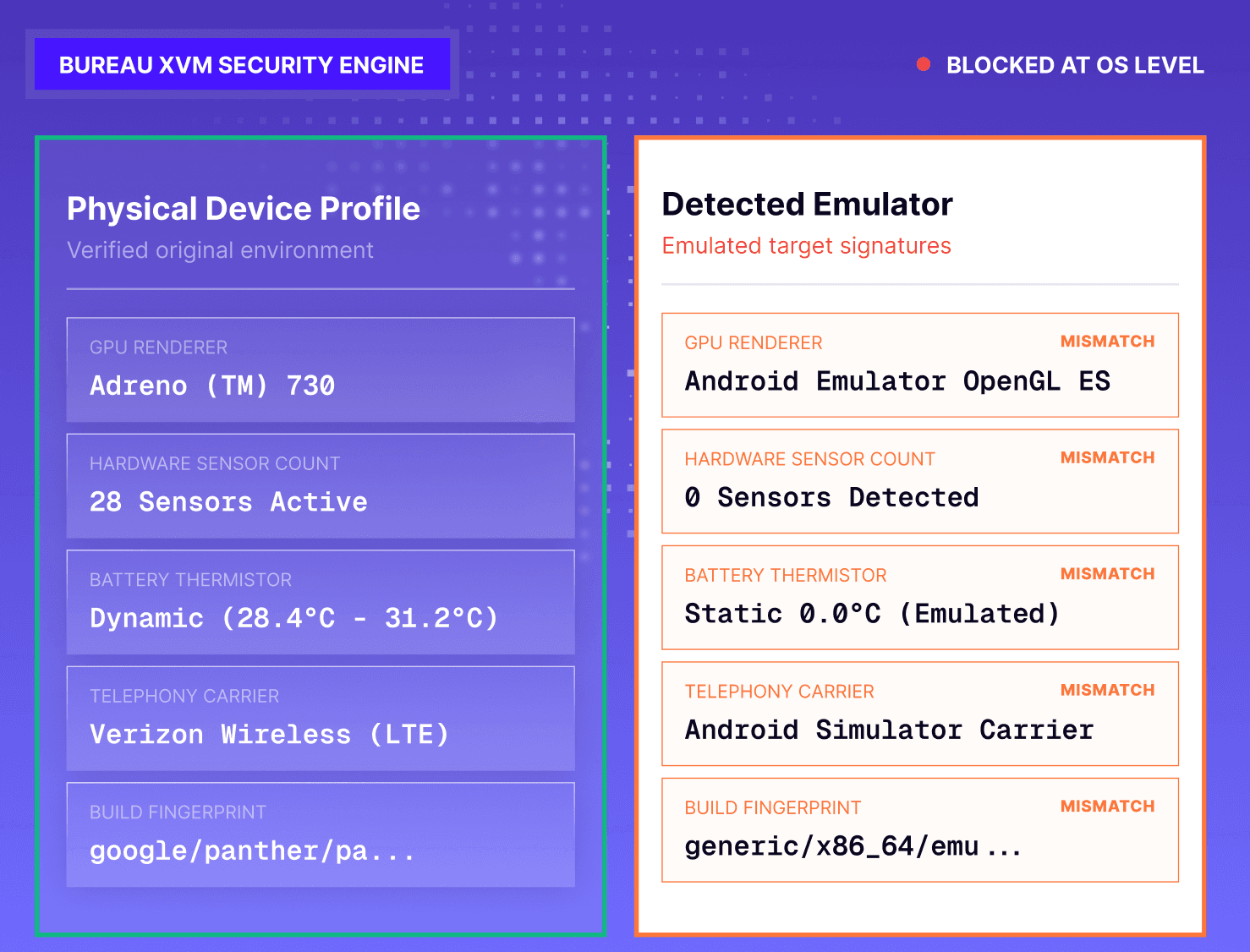
Bureau RASP comparing physical Android device signals with emulator characteristics to detect a virtual operating system.
Network trust: Bureau checks whether communication between the app and its backend is being intercepted or manipulated, including attempts involving proxies, session hijacking, replay attacks, or location spoofing.
Policy enforcement: Teams can define what happens when a threat is detected. An event can be recorded, shown as a warning, used to restrict an action, or blocked altogether. Device, session, timestamp, and enforcement details remain available for investigation.
Overlay detection is one example of this policy in action. Bureau can identify a suspicious overlay before it interferes with a protected screen.

Bureau RASP identifying a suspicious overlay and blocking it while recognizing the protected host application as safe.
Runtime signals can also work alongside Bureau’s device intelligence and behavioral biometrics, giving risk teams more context about the device and how the user is interacting with the app.
The example below shows how Bureau distinguishes variable human touch patterns from rigid, scripted gestures.
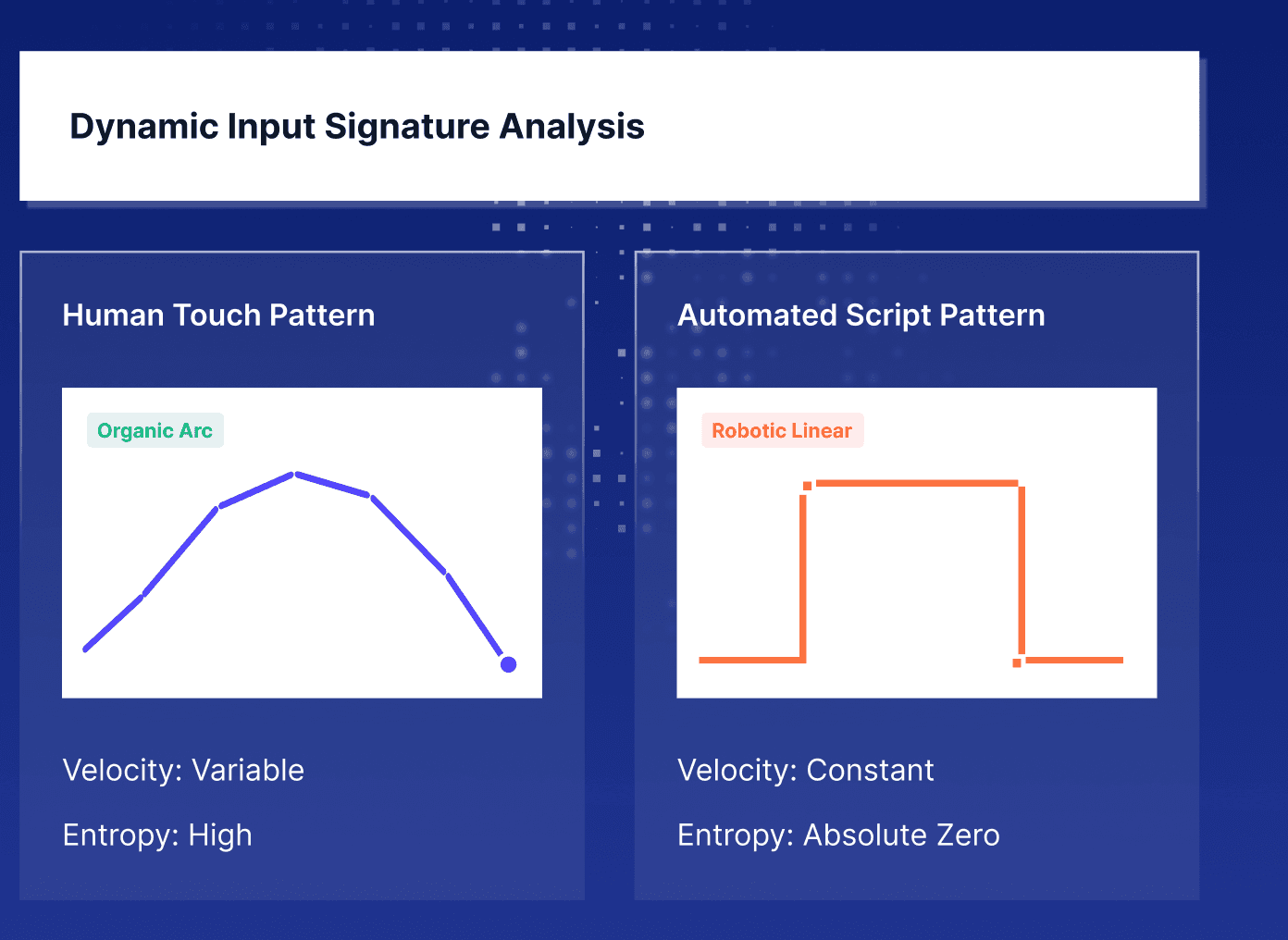
Bureau behavioral analysis comparing variable human touch patterns with robotic software-generated gestures.
Policies can be updated through the dashboard without changing application code, while the RASP SDK can be integrated in under two minutes.
Related Read: Compare 8 RASP Tools for Mobile Apps, Servers, and Cloud
Build Mobile App Security for the Full Application Lifecycle
Strong mobile app security comes down to three connected layers:
Build securely: Design and code with security in mind.
Test continuously: Combine multiple testing methods and standards.
Protect at runtime: Detect hostile environments and active attacks after deployment.
Bureau extends mobile app security into production with RASP, device intelligence, and behavioral biometrics working together to identify risky devices, abnormal behavior, and runtime threats as they happen.
Book a demo to see Bureau’s RASP in action and explore how runtime protection can strengthen security beyond pre-release testing.
FAQs
1. What is mobile app security?
Mobile app security is the set of practices and controls used to protect mobile applications from data theft, unauthorized access, tampering, reverse engineering, insecure communication, and runtime attacks. It spans secure development, testing, application hardening, deployment, and ongoing protection.
2. Why is mobile app security important?
Mobile apps handle credentials, personal data, payment information, and sensitive business logic while running on devices organizations do not control. Strong app security helps reduce exposure to account takeover, data theft, fraudulent transactions, app tampering, and intellectual property theft.
3. What are the most common mobile app security vulnerabilities?
Common vulnerabilities include insecure data storage, weak authentication, broken authorization, insecure APIs, poor session management, vulnerable third-party libraries, weak network security, hardcoded secrets, and inadequate protection against reverse engineering, app tampering, or runtime manipulation.
4. How can organizations secure mobile applications?
Start with threat modeling and secure architecture, protect data and APIs, enforce authentication and authorization server-side, follow secure coding practices, test throughout development, harden the application against manipulation, and monitor deployed apps for active runtime threats.
5. What types of mobile app security testing should teams use?
Teams typically combine SAST (Static Application Security Testing), DAST (Dynamic Application Security Testing), SCA (Software Composition Analysis), IAST (Interactive Application Security Testing), and mobile penetration testing. Each method looks for a different class of weakness, so no single test provides complete coverage. Testing should then be complemented by runtime protection such as RASP, which helps detect and respond to threats that appear after the app is deployed.
6. What is RASP in mobile app security?
Runtime Application Self-Protection (RASP) protects an application while it is running. It can detect conditions such as rooting, jailbreaking, app tampering, code injection, and network manipulation, then respond according to the security policy set by the business.
An attacker does not always need to break the app to compromise what it does. On a manipulated device, they can change what the app sees, what the user sees, or what gets sent to the backend. The code may remain unchanged, and the session may still look valid, but the outcome can be very different from what the business intended.
That changes the whole security problem after release. Secure coding and pre-release testing can reduce weaknesses in the application itself, but they cannot control the environment where the app eventually runs.
For businesses handling payments, identities, or account access, mobile app security must protect more than the code that ships. It must account for what happens when the app is running in conditions the business no longer controls.
How Mobile App Security Changes Across the App Lifecycle
Mobile app security covers the controls that protect an application from the moment it is designed through the time it is running on a user’s device.
The risks change at each stage. During development, teams can review code, test dependencies, and fix weaknesses before release. After release, the focus shifts to detecting and responding to threats that appear while the app is in use.
Security therefore has to change as the risks around the app change:
Secure design identifies what needs protection before development begins. Teams map sensitive data, likely abuse scenarios, and the controls needed to reduce those risks. Sensitive decisions such as authorization and transaction validation should stay on the server rather than depend on logic inside the app.
Secure development turns those decisions into code. The focus is on reducing vulnerabilities, protecting sensitive functions, and limiting what APIs expose to the mobile client.
Security testing looks for weaknesses before release. This includes issues in the code, third-party components, Application Programming Interfaces (APIs), and the way the app behaves during testing.
Application hardening makes the released app harder to inspect, copy, or alter. Techniques such as code obfuscation and integrity checks can make reverse engineering and tampering more difficult.
Runtime protection focuses on what happens after the app starts running. It can detect attempts to interfere with the app, inject code, or run it in a compromised environment.
Continuous monitoring shows what is happening in production. Those findings should feed back into patches, security rules, test cases, and future releases rather than remain isolated as production incidents.
Version management closes another common gap. Fixing a vulnerability does not remove the risk if users can continue running an insecure release, so teams need to track supported versions and retire builds that can no longer be protected safely.
Frameworks such as the Mobile Application Security Verification Standard (MASVS) from the Open Worldwide Application Security Project (OWASP) can help teams assess whether controls remain effective across authentication, data storage, network communication, privacy, and resilience.
Mobile app security is also different from mobile device security. While device security protects the operating system and the device itself, app security protects how the application runs, handles data, and responds when the environment around it changes.
A secure device can reduce some risk, but the application still needs its own protection. If the app cannot recognize when its behavior has been altered, controls that worked during development may no longer work as intended in production.
How Common Mobile App Security Risks Turn Into Attacks
Mobile attacks often start with one weakness and expand from there. An exposed token can reveal an API, weak session controls can keep an attacker inside after login, and reverse engineering can show them how sensitive parts of the app work and where they may be vulnerable.
Before looking at those attack paths in detail, three terms are worth separating:
A vulnerability is a weakness in code, design, configuration, or architecture.
A threat is the actor, malware, tool, or attack method capable of exploiting that weakness.
Risk reflects how likely that exploitation is and what the business stands to lose if it succeeds.
Most mobile app attacks can be traced back to five recurring areas of weakness:
1. Data, Authentication, and API Security Risks
Some of the most damaging weaknesses are invisible to the user. Exposed credentials, tokens, encryption keys, or transaction data can give attackers an opening, while weak authentication and session controls can extend that access.
APIs create another route. If sensitive actions can be triggered directly through backend endpoints, an attacker may bypass checks built into the app.
An Akamai study found that 96% of surveyed financial institutions had experienced an API-related security incident in the previous year, while 40% reported API-related data breaches or leaks. This means weak API controls can expose far more than the mobile interface itself.
Sensitive actions and business rules should therefore be validated on the server rather than trusted to the mobile app.
2. Reverse Engineering, Tampering, and Code Manipulation
Once a mobile app is distributed, attackers can inspect its Android Application Package (APK) or iOS binary to understand how it works. This can expose API endpoints, embedded secrets, and security logic.
Attackers may:
Modify or repackage the app
Remove restrictions
Inject code
Hook functions
Alter runtime behavior
This is why released apps need barriers against tampering even after they have passed security testing. A 2025 peer-reviewed study found that 24.1% of the Android apps examined had implemented fewer than half of the app-hardening techniques assessed, and only 26 apps implemented all eight techniques. That leaves many apps with fewer barriers between inspection and manipulation.
3. Compromised Devices and Hostile Runtime Environments
A secure app can still behave differently when the device beneath it has been compromised. Rooted or jailbroken devices can remove protections the operating system normally provides. Emulators, app clones, device masking, and GPS spoofing can also make a suspicious device appear legitimate.
Attackers can use that access to interfere with the app while it is running or automate activity across large numbers of devices. Mobile app protection therefore needs visibility into the environment where the application is actually executing.
4. Network, Session, and User Interface Attacks
An attacker does not always need to compromise the app itself. They can use Weak Transport Layer Security (TLS) settings or poor certificate validation to intercept or alter communications between the app and its backend systems. Stolen sessions and session hijacking can also let them continue as an authenticated user without logging in again.
The screen itself can become part of the attack. For example, an overlay can place a fake interface over a legitimate app and trick a user into entering information or approving an action. This is why protecting the network connection alone does not protect everything that happens during a mobile session.
5. Third-Party Components and Software Supply Chain Risks
An app also inherits risk from code the development team did not write. Libraries, Software Development Kits (SDKs), frameworks, and external services may contain vulnerabilities or request more access than they need.
A weakness in any one of the components can become a weakness in the application, even when the first-party code is secure. Teams therefore need to know which third-party dependencies are in each release, and whether they remain safe to use.
Taken together, these risks show how one weakness can open the door to another. An attacker who gains access through a compromised device, exposed API, or weak session can use that foothold to tamper with the app, steal data, or carry out fraudulent actions.
What Types of Mobile App Security Testing Should Teams Use?
No single testing method can see the entire mobile attack surface. Some methods examine code before execution, others test the app while it runs, and manual assessments look for attack paths automated tools may miss.
Teams need several methods because each answers a different security question.
Method | How It Works | What It Helps Find | When It Is Used |
Static Application Security Testing (SAST) | Examines source code, bytecode, or binaries without running the app | Insecure coding patterns, hardcoded secrets, unsafe Application Programming Interfaces (APIs), cryptographic misuse, and validation issues | During development and builds |
Dynamic Application Security Testing (DAST) | Tests the application while it is running | Weaknesses in authentication, session handling, network communication, and exposed functionality that may not appear in static analysis | Against production-like builds in realistic test environments |
Software Composition Analysis (SCA) | Identifies open-source libraries, Software Development Kits (SDKs), and other third-party components used by the app | Known vulnerabilities, outdated packages, and risky dependencies | During development and Continuous Integration/Continuous Delivery (CI/CD) |
Interactive Application Security Testing (IAST) | Monitors the application inside an instrumented test environment and connects runtime activity to the underlying code | Runtime weaknesses and the specific code paths responsible for them | During instrumented testing |
Penetration testing | Tests the app from an adversarial perspective using techniques such as reverse engineering, API abuse, network interception, and business-logic manipulation | Exploitable attack paths and combinations of weaknesses that automated tools may miss | At planned assessment intervals and before high-risk releases |
These methods are complementary rather than interchangeable. SAST may catch a hardcoded secret, while DAST may expose weak session handling. SCA can flag a vulnerable dependency, IAST can trace a runtime issue back to its source, and penetration testing can show how separate weaknesses combine into a practical attack path.
Preventive Measures and Best Practices for Mobile App Security
Effective mobile app security depends on several controls working together across development and production. The aim is to prevent weaknesses early, limit the damage when attackers find them, and detect threats that appear only after deployment.
Five practices help reduce risk across the application lifecycle:
1. Make Security Part of Development
Security decisions should be made while the app is being designed and built. Threat modeling can identify where sensitive data or high-risk actions need stronger protection, while secure coding standards give developers clear requirements to follow.
Build security checks into the development workflow. Code reviews and automated testing can catch issues before they move further into production, with clear ownership for fixing what those checks uncover.
2. Protect Sensitive Data, APIs, and Sessions
Every piece of sensitive data stored on a device gives an attacker something worth targeting. Apps can keep that footprint as small as possible. Credentials and tokens belong in the secure storage provided by Android or iOS, while sensitive data needs protection both when stored and when transmitted.
A successful login does not create unlimited access, because sessions need clear expiry and revocation rules. Actions such as changing account details, resetting credentials, or approving a high-risk transaction may also require the user to authenticate again.
Backend APIs should assume that the mobile client can be manipulated. Validate requests on the server, and check authorization before any sensitive action is completed. Keep business rules on the server so altering the app does not give an attacker control over the decision itself.
3. Harden the Application Against Reverse Engineering and Tampering
Once an app is distributed, attackers can download the same binary as legitimate users and study it at their own pace. Hardening makes that process slower and unauthorized changes easier to detect. For instance:
Code obfuscation can make application logic harder to understand.
Anti-debugging and integrity checks can reveal attempts to inspect or alter the app.
Clone detection can identify repackaged versions.
4. Respond to Risk While the App Is Running
After release, teams also need to know when the conditions around the app could change how it behaves. A rooted device, emulator, injected code, or malicious overlay can turn an otherwise legitimate session into a higher-risk one.
Runtime controls should connect those signals to a response. A lower-risk event may only need to be recorded, and an attempt to interfere with a sensitive action may justify restricting the action or blocking the session.
The response should match the risk level, because treating every anomaly the same can create unnecessary friction, while failing to act on high-risk signals leaves the application exposed.
5. Use Production Findings to Improve Mobile App Security
Finding a vulnerability has little value if it remains open long enough to be exploited. Teams should:
Retest after significant releases.
Keep third-party components updated.
Patch confirmed vulnerabilities.
Monitor whether older app versions remain in use.
Production findings should also become new test cases or security rules so the same weakness is less likely to return in a future release.
Track measures that show whether security issues are actually being resolved, such as:
The time taken to fix critical vulnerabilities
The share of users on unsupported app versions
Repeated tampering attempts
False-positive rates
The time between detecting a high-risk event and responding to it
The gap between detection and remediation can be significant. Verizon's 2026 DBIR found that only 26% of critical known-exploited vulnerabilities were fully remediated during 2025. For security teams, this implies identifying a weakness is only the first step. Someone still needs to own the fix, prioritize it, and verify that the exposure has actually been removed.
Where Runtime Application Self-Protection Fits
Testing can show how an application behaves before release, but Runtime Application Self-Protection (RASP) addresses a different question: "What should happen when the deployed app detects that its execution is being interfered with?"
RASP works inside the application while it is running. Depending on the risk and the policy set by the business, it can detect suspicious conditions, such as a rooted or jailbroken device, app tampering, code injection, or attempts to hook into the app, and trigger an appropriate response. That may mean:
Recording the event
Warning the user
Restricting a sensitive action
Blocking the session
This matters because some problems only appear during execution. For example, a 2025 study of 3,885 Android apps found runtime exposure of personally identifiable information (PII) in 233 applications, accounting for 7,485 privacy violations. The study shows why some issues only become visible while an app is running.
RASP adds protection at that point. It gives the application a way to recognize suspicious runtime conditions and respond while the activity is still happening, rather than waiting for the issue to surface later through logs, fraud losses, or an investigation.
Related Read: RASP Security: How It Works, Threats, and Implementation
How Bureau Protects Mobile Apps With RASP
Bureau’s Runtime Application Self-Protection (RASP) checks the application while it is running and evaluates whether the app, device, and network can be trusted.
Its four-layer zero trust model also applies policy controls that determine how the app responds when risk is detected.
Application trust: Bureau checks whether the app has been inspected, modified, repackaged, or interfered with. Its custom virtualization technology converts selected application logic into a private instruction format, making it harder to analyze with standard reverse-engineering tools.
The example below shows the shift from readable application logic to protected bytecode.
Bureau XVM compiler converting readable application logic into proprietary bytecode inside a hardened virtual machine container.
Device trust: Bureau can identify conditions such as rooting, jailbreaking, emulation, cloning, or attempts to manipulate the runtime environment.
The example below shows how device signals can distinguish a physical Android device from an emulator.
Bureau RASP comparing physical Android device signals with emulator characteristics to detect a virtual operating system.
Network trust: Bureau checks whether communication between the app and its backend is being intercepted or manipulated, including attempts involving proxies, session hijacking, replay attacks, or location spoofing.
Policy enforcement: Teams can define what happens when a threat is detected. An event can be recorded, shown as a warning, used to restrict an action, or blocked altogether. Device, session, timestamp, and enforcement details remain available for investigation.
Overlay detection is one example of this policy in action. Bureau can identify a suspicious overlay before it interferes with a protected screen.
Bureau RASP identifying a suspicious overlay and blocking it while recognizing the protected host application as safe.
Runtime signals can also work alongside Bureau’s device intelligence and behavioral biometrics, giving risk teams more context about the device and how the user is interacting with the app.
The example below shows how Bureau distinguishes variable human touch patterns from rigid, scripted gestures.
Bureau behavioral analysis comparing variable human touch patterns with robotic software-generated gestures.
Policies can be updated through the dashboard without changing application code, while the RASP SDK can be integrated in under two minutes.
Related Read: Compare 8 RASP Tools for Mobile Apps, Servers, and Cloud
Build Mobile App Security for the Full Application Lifecycle
Strong mobile app security comes down to three connected layers:
Build securely: Design and code with security in mind.
Test continuously: Combine multiple testing methods and standards.
Protect at runtime: Detect hostile environments and active attacks after deployment.
Bureau extends mobile app security into production with RASP, device intelligence, and behavioral biometrics working together to identify risky devices, abnormal behavior, and runtime threats as they happen.
Book a demo to see Bureau’s RASP in action and explore how runtime protection can strengthen security beyond pre-release testing.
FAQs
1. What is mobile app security?
Mobile app security is the set of practices and controls used to protect mobile applications from data theft, unauthorized access, tampering, reverse engineering, insecure communication, and runtime attacks. It spans secure development, testing, application hardening, deployment, and ongoing protection.
2. Why is mobile app security important?
Mobile apps handle credentials, personal data, payment information, and sensitive business logic while running on devices organizations do not control. Strong app security helps reduce exposure to account takeover, data theft, fraudulent transactions, app tampering, and intellectual property theft.
3. What are the most common mobile app security vulnerabilities?
Common vulnerabilities include insecure data storage, weak authentication, broken authorization, insecure APIs, poor session management, vulnerable third-party libraries, weak network security, hardcoded secrets, and inadequate protection against reverse engineering, app tampering, or runtime manipulation.
4. How can organizations secure mobile applications?
Start with threat modeling and secure architecture, protect data and APIs, enforce authentication and authorization server-side, follow secure coding practices, test throughout development, harden the application against manipulation, and monitor deployed apps for active runtime threats.
5. What types of mobile app security testing should teams use?
Teams typically combine SAST (Static Application Security Testing), DAST (Dynamic Application Security Testing), SCA (Software Composition Analysis), IAST (Interactive Application Security Testing), and mobile penetration testing. Each method looks for a different class of weakness, so no single test provides complete coverage. Testing should then be complemented by runtime protection such as RASP, which helps detect and respond to threats that appear after the app is deployed.
6. What is RASP in mobile app security?
Runtime Application Self-Protection (RASP) protects an application while it is running. It can detect conditions such as rooting, jailbreaking, app tampering, code injection, and network manipulation, then respond according to the security policy set by the business.
TABLE OF CONTENTS
See More
Recommended Blogs


Landing Page.
Simple, bold.
Sign Up
Download

Products
Solutions


© 2026 Bureau . All rights reserved.
Solutions
Industries
Resources
Company
Solutions
Industries
Resources
Company
© 2026 Bureau . All rights reserved.
Follow Us
Leave behind fragmented tools. Stop fraud rings, cut false declines, and deliver secure digital journeys at scale
Our Presence








Leave behind fragmented tools. Stop fraud rings, cut false declines, and deliver secure digital journeys at scale
Our Presence
© 2026 Bureau . All rights reserved.