How Android Root Detection Works and Where Checks Can Fail
How Android Root Detection Works and Where Checks Can Fail
How Android Root Detection Works and Where Checks Can Fail
Explore Android root detection methods, from root files and apps to system settings and runtime tampering. See how false alerts shape fraud risk decisions.
Author
Team Bureau


See how Bureau has helped industry leaders defend against networked Industrial-scale frauds →
Schedule a Demo
TABLE OF CONTENTS
See Less
Android restricts each application's access to other apps' data and protected system resources, limiting what it can read, modify, or execute without authorization. Root access can bypass Android's security restrictions, allowing privileged software to access sensitive data or interfere with app processes.
Android root detection involves checking whether a device has elevated system privileges that could affect an app's security. Common methods include looking for root-related files, checking installed apps, inspecting system settings, and testing access to restricted functions.
However, systemless and kernel-level rooting methods can conceal root access from standard checks, while modified Android builds can trigger false root warnings.
A device may pass several checks and still be rooted, making it difficult to determine how much confidence an app can place in its root detection results.
What Is Android Root Detection?
Android root detection is the process of checking whether an Android device has gained root or superuser privileges that bypass normal operating system restrictions. Mobile banking, fintech, and payment apps use root detection to identify changes that could weaken device security.
Android root detection typically involves:
Root files and packages: Checking for the ‘su’ binary and known root-management apps.
System configuration: Inspecting modified system properties and unusual filesystem permissions.
Elevated access: Testing whether commands can execute with superuser privileges.
Android normally isolates apps through application sandboxing, restricting access to protected system resources. Rooting can bypass certain restrictions by granting permissions to modify protected system files or execute privileged commands.
Here's how the resulting access differs between standard and rooted Android devices:
Standard Android | Rooted Android |
Normal operating system restrictions apply. | Superuser privileges may be available. |
Access to protected system resources is restricted. | Protected resources may become accessible. |
Apps operate within expected security boundaries. | Runtime and security assumptions can change. |
Sensitive system modifications are restricted. | Deeper system modifications may be possible. |
Root detection results need to distinguish signs of system modification from evidence of actual superuser access. For example, a modified system property may indicate a custom Android build, while successful privileged command execution provides stronger evidence of root access.
Related Read: How to Secure Mobile Apps Across Development and Runtime
Why Do Apps Detect Rooted Android Devices?
Root access can increase the impact of mobile attacks by giving malicious software greater control over system functions and application behavior. For financial institutions and digital payment platforms, compromised device environments can expose customer accounts to fraud and conceal unauthorized activity by manipulating security checks.
The main fraud-related security concerns include:
Short Message Service (SMS) and one-time password (OTP) interception: Malware with elevated access may capture authentication codes, enabling account takeover and fraudulent transfers. Financial institutions face transaction losses, customer disputes, and recovery costs.
Accessibility abuse and overlay malware: Malicious accessibility services can manipulate screen interactions, while deceptive overlays steal credentials or trick users into authorizing payments. Both techniques can compromise banking sessions without root access, although elevated privileges may increase their capabilities.
Payment-flow tampering: Runtime manipulation can alter transaction details or interfere with application security checks. Undetected payment tampering can result in unauthorized transfers and financial losses.
Mobile application security standards: OWASP's 2026 root/jailbreak detection guidance warns that inadequate root detection can let attackers bypass fraud controls and access sensitive app data. It recommends layered detection to identify compromised environments before attackers exploit elevated privileges.
App cloning and fraudulent multi-accounting: Manipulated app environments can help fraudsters operate multiple accounts and evade device-based restrictions. Financial platforms face fraudulent onboarding, promotional losses, and increased exposure to coordinated fraud.
For fraud involving connected accounts, Bureau's Mule Score uses device, behavioral, and transaction signals to identify potential mule networks before suspicious funds move through multiple accounts.
Assessing root-related findings alongside suspicious app behavior and transaction anomalies gives fraud teams stronger evidence of potential compromise.
What Are the Common Android Root Detection Techniques?
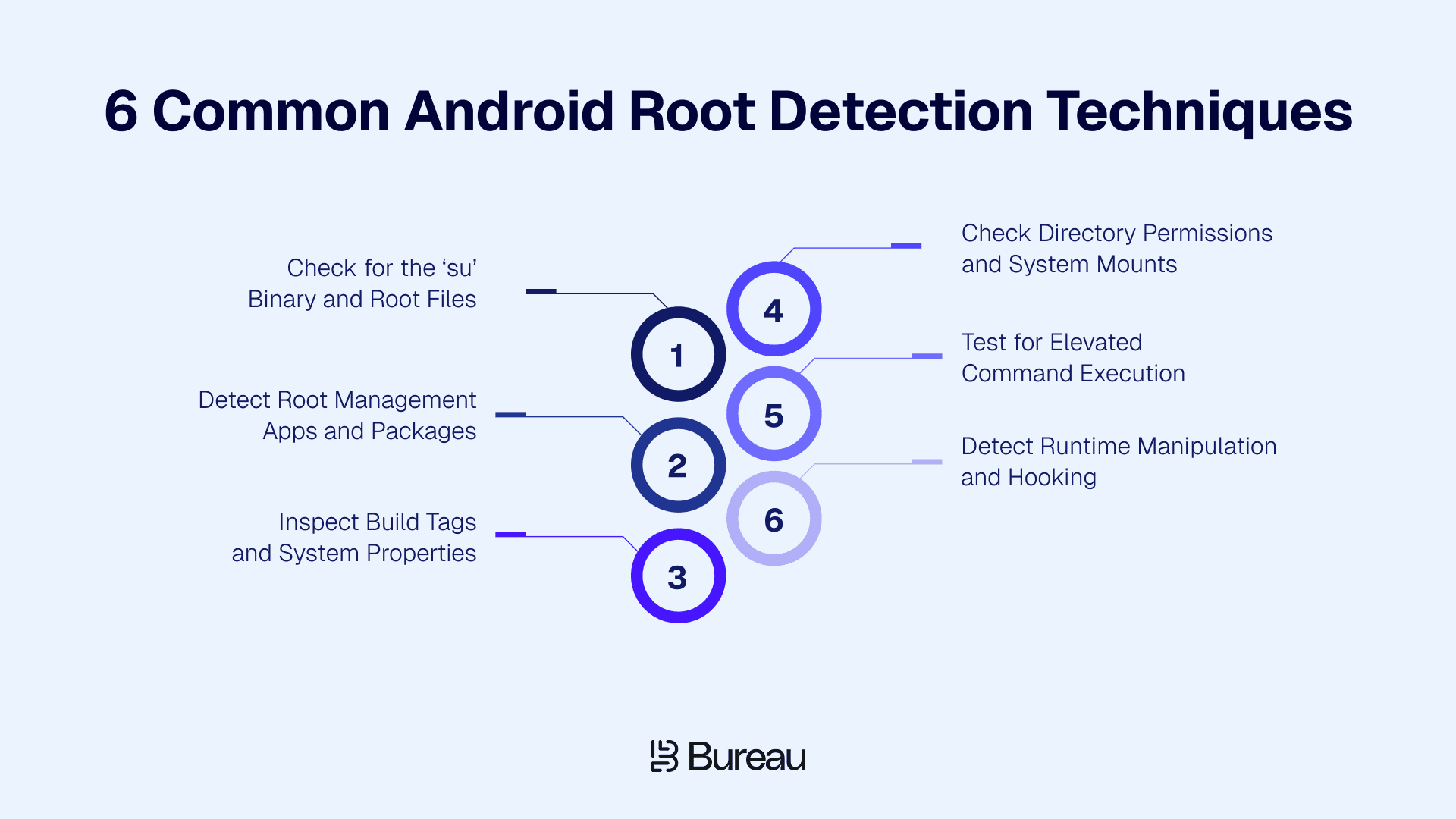
Android root detection evaluates multiple security signals together, since individual checks reveal only part of a device's root status. Applications assess findings from filesystem checks and runtime behavior to estimate the likelihood of root access and apply risk-based security policies.
Root-management tools can hide their presence from individual detection methods while retaining superuser access. For example, a device running a root-hiding framework can pass traditional file checks even when root privileges remain available.
The following six techniques examine different indicators of root access, each revealing information that other checks might miss.
1. Check for the ‘su’ Binary and Root Files
One of the simplest root detection methods is checking whether the Android filesystem contains a ‘su’ binary. Short for 'substitute user,' ‘su’ is commonly used to request superuser privileges, which grant elevated control over protected system functions.
Traditional Android root checkers search locations such as ‘/system/bin’ and ‘/system/xbin’ for the binary and other known root-related files. Finding a ‘su’ binary suggests root access is available, but developers still need to verify whether privileged commands can execute.
Modern rooting tools introduce additional challenges for filesystem checks:
Magisk: Supports systemless modifications, while Zygisk enables code to run within app processes. Magisk's DenyList controls which processes receive certain Magisk modifications.
Shamiko: A Zygisk-based module designed to conceal Magisk and Zygisk traces from selected applications.
KernelSU: Manages root access at the kernel level, allowing approved applications to obtain superuser privileges while restricting access for others.
APatch: Uses kernel-level root management, allowing privileged access without relying on conventional filesystem-based root indicators.
For example, an Android root checker may fail to locate ‘su’ when KernelSU restricts access to approved applications. The result only confirms that the checker could not observe the binary, so additional device and runtime signals are needed to assess root access.
2. Detect Root Management Apps and Packages
Checking for root files alone can miss devices where root access is managed through installed applications such as Magisk and SuperSU. Android's ‘PackageManager’ Application Programming Interface (API) provides an additional detection method by identifying packages associated with root-management software.
The ‘getPackageInfo()’ method checks for a specified package name. On Android 11 and later, package visibility restrictions require developers to declare relevant packages in the app's manifest for reliable detection.
Finding a known root-management package indicates software capable of granting superuser access. Magisk can also conceal its package identity, causing package checks to miss rooted devices.
3. Inspect Build Tags and System Properties
Android build information provides another way to identify modified operating system environments. Developers can inspect ‘ro.build.tags’ to check how the Android build was signed:
‘release-keys’: Indicates a build signed with release signing keys, as commonly used in production firmware.
‘test-keys’: Indicates a build signed with publicly available development keys, commonly associated with custom or testing builds.
Applications can also inspect system properties, historically stored in ‘build.prop’, for unexpected configuration changes. For example, test-keys can indicate custom firmware, but a custom read-only memory (ROM) build can carry the same tag without providing root access. Developers need additional root checks to confirm whether superuser privileges are available.
4. Check Directory Permissions and System Mounts
Root access can change how Android protects system directories and partitions. Developers can check whether normally restricted locations, such as ‘/system’, allow unexpected write access or have been mounted with different permissions.
A system partition mounted as writable when the device expects read-only access can indicate system modification. Modern systemless rooting methods can also retain privileged access without altering the expected mount configuration.
5. Test for Elevated Command Execution
Command execution checks determine whether an application can obtain superuser privileges instead of relying solely on installed files or packages.
An Android app can attempt to invoke ‘su’ and check whether a privileged command succeeds. Successful execution provides stronger evidence of root access because it demonstrates elevated privileges in practice.
Root-management tools can also restrict privileged commands to approved applications or manipulate the results returned to detection routines. A failed execution test must therefore be assessed alongside other device signals.
6. Detect Runtime Manipulation and Hooking
Modern root-hiding tools such as Magisk, Shamiko, KernelSU, and APatch can conceal indicators used by conventional root detection methods. Runtime manipulation checks identify suspicious changes occurring while an application is running.
Common signs of runtime manipulation include:
Hooking: Evidence that application or system functions have been intercepted or modified.
Instrumentation: Signs of tools attaching to a running app to inspect or alter its behavior.
Code injection: Unexpected code loaded into the application's process.
Runtime tampering: Changes to application execution that could interfere with security checks.
Runtime checks can reveal manipulation missed by traditional root detection, although attackers can interfere with their results. Google's Play Integrity API adds independent verification through:
‘deviceIntegrity’ verdict: Indicates whether a device meets Google's integrity requirements, including ‘MEETS_DEVICE_INTEGRITY.’
Server-side verification: Uses mobile app attestation to let application backends verify integrity tokens through Google's infrastructure.
Combining traditional root checks with runtime detection and server-validated integrity signals provides a more reliable assessment of device risk, even when the application environment is compromised.
What Should an App Do When It Detects a Rooted Device?
Detecting root access should trigger a risk assessment before an application takes action. The appropriate response depends on the application's security policy, the sensitivity of the activity, and whether other signs of compromise are present.
Here's how different root detection findings can influence an application's security response:
Detection scenario | Risk context | Possible response |
Root detected alone | No additional compromise indicators | Monitor activity or warn the user |
Root detected during a sensitive action | Payment, account changes, or access to sensitive data | Require additional verification or restrict the action |
Root detected with runtime anomalies | Hooking, tampering, or instrumentation | Restrict sensitive functionality |
Multiple strong compromise indicators | Evidence of active application or runtime manipulation | Block the operation or terminate the session |
According to UK Finance's 2026 Annual Fraud Report, remote banking fraud prevention reached 70% in 2025, up from 65% in 2024. The improvement highlights the value of stronger fraud prevention across remote banking, where controls such as Android root detection can contribute to broader security efforts.
Consider three scenarios in which a mobile banking app detects root access on the same Android device:
Routine login: Root access is detected without signs of active tampering. Its risk policy permits login while recording the finding or warning the customer.
High-value transfer: Root access is detected during an unusual fund transfer. The app requires additional verification before processing the payment.
Runtime manipulation: Root access appears alongside evidence of hooking or application tampering. The app blocks the sensitive operation to prevent further interference.
Blanket blocking can unnecessarily restrict legitimate users. Monitoring root-related activity also provides evidence for investigating suspicious sessions.
Bureau's Behavioral Biometrics can add another layer of assessment by identifying unusual interaction patterns during a session, helping security teams evaluate suspicious activity without relying solely on device status.
Related Read: Adaptive Authentication: Risk-Decisioning That Responds to a Session's Changing Risk
How Does Root Detection Fit Into Runtime App Protection?
Traditional Android root detection checks can miss compromised devices when attackers hide root-related files or manipulate detection results. Runtime threats can also interfere with an application's security controls after launch, creating risks that conventional root checks cannot identify.
Runtime application protection extends security coverage by identifying application tampering during execution and supporting risk decisions with additional integrity signals.
To address the limitations of standalone root detection, mobile app security teams can combine the following protections:
Root hiding and detection bypass: Modern rooting tools can conceal root files or manipulate detection results, allowing compromised devices to evade conventional checks. Runtime monitoring adds another layer of visibility into attempts to interfere with application security.
False positives and false negatives: Custom firmware can trigger false root warnings, while concealed root access can go undetected. In AV-Comparatives' 2025 Mobile Security Review, Google Play Protect detected 98.8% of 3,322 malicious Android applications tested. The remaining gap shows why even effective mobile security controls need complementary protections to address threats individual tools miss.
Application and runtime integrity: Runtime Application Self-Protection (RASP) detects threats during application execution, including repackaging, hooking, debugging, and code injection. Runtime monitoring also identifies attempts to alter application behavior or disable security controls.
Server-validated device integrity: Independently verified integrity signals give security teams additional evidence when local root checks return incomplete or manipulated results. Backend risk assessments can use these findings to identify inconsistencies between reported device conditions and verified integrity status.
Contextual risk decisioning: Root and runtime findings become more actionable when evaluated alongside device intelligence, user identity, and session behavior. Transaction context further helps security teams determine when stronger controls are warranted.
Bureau's Unified Risk Decisioning Platform connects device intelligence with broader fraud risk assessment, while its RASP capabilities address application-level threats. Together, the capabilities support more informed security decisions across mobile applications.
How Bureau Supports Android Root Detection and Fraud Prevention
Bureau helps businesses identify mobile application threats through its Runtime Application Self-Protection solution. RASP monitors suspicious activity during execution to detect root-related threats and application tampering, helping security teams protect sensitive operations from manipulation.
Combined with Bureau's AI-powered risk decisioning, RASP helps security teams detect suspicious activity across connected devices and accounts, extending protection beyond individual account threats.
Bureau supports fraud prevention through four capabilities:
Centralized risk operations: Gives security teams access to application threats and fraud intelligence in one place, reducing time spent switching between tools during investigations.
Configurable risk workflows: Allows teams to set threat-specific rules, risk thresholds, and response policies through no-code/low-code controls, reducing dependence on engineering teams.
Explainable risk decisions: Provides contextual risk findings and decision logs, helping analysts understand suspicious activity, investigate incidents, and maintain audit trails.
Cross-journey fraud detection: Combines Device Intelligence with identity and behavioral signals to recognize repeat devices and suspicious connections across onboarding, login, and transactions.
By connecting application security with device intelligence and fraud analysis, Bureau helps businesses move from isolated account-level defenses to network-level fraud intelligence. Its Account Takeover protection capabilities extend fraud detection across linked devices and suspicious login behavior, helping security teams identify compromised accounts and prevent unauthorized transactions.
Protect Android Apps Beyond Root Detection
Android root detection becomes easier to manage when security teams can address threats without slowing down legitimate app activity. Bureau helps organizations strengthen mobile security while keeping fraud prevention practical.
With Bureau, businesses can:
Reduce false alarms: Minimize unnecessary security friction by assessing root-related findings in the context of actual risk.
Limit fraud exposure: Identify suspicious activity early to reduce the chances of compromised sessions leading to financial losses.
Scale security coverage: Maintain consistent protection as mobile app usage grows, without proportionally increasing security operations workload.
With fewer false alarms, earlier threat detection, and scalable protection, businesses can strengthen Android security without complicating fraud operations. Book a demo with Bureau to see how it can turn Android root detection findings into timely fraud prevention decisions while keeping legitimate transactions moving.
FAQs
1. Why is an Android device being detected as rooted?
An Android app may flag a device as rooted after detecting ‘su’ binaries, root-management packages, modified system properties, or unusual permissions. Custom Android builds can also trigger root warnings without active superuser access. Further verification is necessary to distinguish genuine root access from false positives.
2. How can root access be checked on an Android phone?
Root access can be checked by looking for installed root-management apps such as Magisk or SuperSU or using a reputable Android root checker. Developer-grade verification involves examining multiple device and runtime signals because basic checking utilities can miss root access concealed by modern rooting tools.
3. Should banking apps block rooted Android devices?
Banking apps do not always need to block rooted devices. Restrictions can depend on the application's security policy, regulatory obligations, and evidence of compromise. Risk-based controls allow financial institutions to protect sensitive transactions while minimizing unnecessary disruption for legitimate customers using modified devices.
4. Is Android root detection 100% reliable?
No, Android root detection cannot guarantee that every rooted device will be identified. Root-management tools can conceal modifications or interfere with detection checks, while custom Android configurations can trigger false positives. Bureau's approach combines runtime threat detection with broader device intelligence and fraud risk assessment to support more informed security decisions.
5. How is Android root detection different from Google Play Integrity API?
Android root detection identifies signs of elevated privileges or system modifications through device-level checks. Google's Play Integrity API provides app and device integrity verdicts that application backends can verify through Google's infrastructure. The API provides complementary integrity evidence beyond conventional root detection methods.
6. How does RASP strengthen Android root detection?
Runtime Application Self-Protection (RASP) strengthens Android root detection by identifying threats affecting applications during execution. Runtime monitoring detects suspicious hooking, debugging, code injection, and application tampering. Security teams can combine runtime findings with other risk signals to identify compromised sessions and protect sensitive operations.
Android restricts each application's access to other apps' data and protected system resources, limiting what it can read, modify, or execute without authorization. Root access can bypass Android's security restrictions, allowing privileged software to access sensitive data or interfere with app processes.
Android root detection involves checking whether a device has elevated system privileges that could affect an app's security. Common methods include looking for root-related files, checking installed apps, inspecting system settings, and testing access to restricted functions.
However, systemless and kernel-level rooting methods can conceal root access from standard checks, while modified Android builds can trigger false root warnings.
A device may pass several checks and still be rooted, making it difficult to determine how much confidence an app can place in its root detection results.
What Is Android Root Detection?
Android root detection is the process of checking whether an Android device has gained root or superuser privileges that bypass normal operating system restrictions. Mobile banking, fintech, and payment apps use root detection to identify changes that could weaken device security.
Android root detection typically involves:
Root files and packages: Checking for the ‘su’ binary and known root-management apps.
System configuration: Inspecting modified system properties and unusual filesystem permissions.
Elevated access: Testing whether commands can execute with superuser privileges.
Android normally isolates apps through application sandboxing, restricting access to protected system resources. Rooting can bypass certain restrictions by granting permissions to modify protected system files or execute privileged commands.
Here's how the resulting access differs between standard and rooted Android devices:
Standard Android | Rooted Android |
Normal operating system restrictions apply. | Superuser privileges may be available. |
Access to protected system resources is restricted. | Protected resources may become accessible. |
Apps operate within expected security boundaries. | Runtime and security assumptions can change. |
Sensitive system modifications are restricted. | Deeper system modifications may be possible. |
Root detection results need to distinguish signs of system modification from evidence of actual superuser access. For example, a modified system property may indicate a custom Android build, while successful privileged command execution provides stronger evidence of root access.
Related Read: How to Secure Mobile Apps Across Development and Runtime
Why Do Apps Detect Rooted Android Devices?
Root access can increase the impact of mobile attacks by giving malicious software greater control over system functions and application behavior. For financial institutions and digital payment platforms, compromised device environments can expose customer accounts to fraud and conceal unauthorized activity by manipulating security checks.
The main fraud-related security concerns include:
Short Message Service (SMS) and one-time password (OTP) interception: Malware with elevated access may capture authentication codes, enabling account takeover and fraudulent transfers. Financial institutions face transaction losses, customer disputes, and recovery costs.
Accessibility abuse and overlay malware: Malicious accessibility services can manipulate screen interactions, while deceptive overlays steal credentials or trick users into authorizing payments. Both techniques can compromise banking sessions without root access, although elevated privileges may increase their capabilities.
Payment-flow tampering: Runtime manipulation can alter transaction details or interfere with application security checks. Undetected payment tampering can result in unauthorized transfers and financial losses.
Mobile application security standards: OWASP's 2026 root/jailbreak detection guidance warns that inadequate root detection can let attackers bypass fraud controls and access sensitive app data. It recommends layered detection to identify compromised environments before attackers exploit elevated privileges.
App cloning and fraudulent multi-accounting: Manipulated app environments can help fraudsters operate multiple accounts and evade device-based restrictions. Financial platforms face fraudulent onboarding, promotional losses, and increased exposure to coordinated fraud.
For fraud involving connected accounts, Bureau's Mule Score uses device, behavioral, and transaction signals to identify potential mule networks before suspicious funds move through multiple accounts.
Assessing root-related findings alongside suspicious app behavior and transaction anomalies gives fraud teams stronger evidence of potential compromise.
What Are the Common Android Root Detection Techniques?
Android root detection evaluates multiple security signals together, since individual checks reveal only part of a device's root status. Applications assess findings from filesystem checks and runtime behavior to estimate the likelihood of root access and apply risk-based security policies.
Root-management tools can hide their presence from individual detection methods while retaining superuser access. For example, a device running a root-hiding framework can pass traditional file checks even when root privileges remain available.
The following six techniques examine different indicators of root access, each revealing information that other checks might miss.
1. Check for the ‘su’ Binary and Root Files
One of the simplest root detection methods is checking whether the Android filesystem contains a ‘su’ binary. Short for 'substitute user,' ‘su’ is commonly used to request superuser privileges, which grant elevated control over protected system functions.
Traditional Android root checkers search locations such as ‘/system/bin’ and ‘/system/xbin’ for the binary and other known root-related files. Finding a ‘su’ binary suggests root access is available, but developers still need to verify whether privileged commands can execute.
Modern rooting tools introduce additional challenges for filesystem checks:
Magisk: Supports systemless modifications, while Zygisk enables code to run within app processes. Magisk's DenyList controls which processes receive certain Magisk modifications.
Shamiko: A Zygisk-based module designed to conceal Magisk and Zygisk traces from selected applications.
KernelSU: Manages root access at the kernel level, allowing approved applications to obtain superuser privileges while restricting access for others.
APatch: Uses kernel-level root management, allowing privileged access without relying on conventional filesystem-based root indicators.
For example, an Android root checker may fail to locate ‘su’ when KernelSU restricts access to approved applications. The result only confirms that the checker could not observe the binary, so additional device and runtime signals are needed to assess root access.
2. Detect Root Management Apps and Packages
Checking for root files alone can miss devices where root access is managed through installed applications such as Magisk and SuperSU. Android's ‘PackageManager’ Application Programming Interface (API) provides an additional detection method by identifying packages associated with root-management software.
The ‘getPackageInfo()’ method checks for a specified package name. On Android 11 and later, package visibility restrictions require developers to declare relevant packages in the app's manifest for reliable detection.
Finding a known root-management package indicates software capable of granting superuser access. Magisk can also conceal its package identity, causing package checks to miss rooted devices.
3. Inspect Build Tags and System Properties
Android build information provides another way to identify modified operating system environments. Developers can inspect ‘ro.build.tags’ to check how the Android build was signed:
‘release-keys’: Indicates a build signed with release signing keys, as commonly used in production firmware.
‘test-keys’: Indicates a build signed with publicly available development keys, commonly associated with custom or testing builds.
Applications can also inspect system properties, historically stored in ‘build.prop’, for unexpected configuration changes. For example, test-keys can indicate custom firmware, but a custom read-only memory (ROM) build can carry the same tag without providing root access. Developers need additional root checks to confirm whether superuser privileges are available.
4. Check Directory Permissions and System Mounts
Root access can change how Android protects system directories and partitions. Developers can check whether normally restricted locations, such as ‘/system’, allow unexpected write access or have been mounted with different permissions.
A system partition mounted as writable when the device expects read-only access can indicate system modification. Modern systemless rooting methods can also retain privileged access without altering the expected mount configuration.
5. Test for Elevated Command Execution
Command execution checks determine whether an application can obtain superuser privileges instead of relying solely on installed files or packages.
An Android app can attempt to invoke ‘su’ and check whether a privileged command succeeds. Successful execution provides stronger evidence of root access because it demonstrates elevated privileges in practice.
Root-management tools can also restrict privileged commands to approved applications or manipulate the results returned to detection routines. A failed execution test must therefore be assessed alongside other device signals.
6. Detect Runtime Manipulation and Hooking
Modern root-hiding tools such as Magisk, Shamiko, KernelSU, and APatch can conceal indicators used by conventional root detection methods. Runtime manipulation checks identify suspicious changes occurring while an application is running.
Common signs of runtime manipulation include:
Hooking: Evidence that application or system functions have been intercepted or modified.
Instrumentation: Signs of tools attaching to a running app to inspect or alter its behavior.
Code injection: Unexpected code loaded into the application's process.
Runtime tampering: Changes to application execution that could interfere with security checks.
Runtime checks can reveal manipulation missed by traditional root detection, although attackers can interfere with their results. Google's Play Integrity API adds independent verification through:
‘deviceIntegrity’ verdict: Indicates whether a device meets Google's integrity requirements, including ‘MEETS_DEVICE_INTEGRITY.’
Server-side verification: Uses mobile app attestation to let application backends verify integrity tokens through Google's infrastructure.
Combining traditional root checks with runtime detection and server-validated integrity signals provides a more reliable assessment of device risk, even when the application environment is compromised.
What Should an App Do When It Detects a Rooted Device?
Detecting root access should trigger a risk assessment before an application takes action. The appropriate response depends on the application's security policy, the sensitivity of the activity, and whether other signs of compromise are present.
Here's how different root detection findings can influence an application's security response:
Detection scenario | Risk context | Possible response |
Root detected alone | No additional compromise indicators | Monitor activity or warn the user |
Root detected during a sensitive action | Payment, account changes, or access to sensitive data | Require additional verification or restrict the action |
Root detected with runtime anomalies | Hooking, tampering, or instrumentation | Restrict sensitive functionality |
Multiple strong compromise indicators | Evidence of active application or runtime manipulation | Block the operation or terminate the session |
According to UK Finance's 2026 Annual Fraud Report, remote banking fraud prevention reached 70% in 2025, up from 65% in 2024. The improvement highlights the value of stronger fraud prevention across remote banking, where controls such as Android root detection can contribute to broader security efforts.
Consider three scenarios in which a mobile banking app detects root access on the same Android device:
Routine login: Root access is detected without signs of active tampering. Its risk policy permits login while recording the finding or warning the customer.
High-value transfer: Root access is detected during an unusual fund transfer. The app requires additional verification before processing the payment.
Runtime manipulation: Root access appears alongside evidence of hooking or application tampering. The app blocks the sensitive operation to prevent further interference.
Blanket blocking can unnecessarily restrict legitimate users. Monitoring root-related activity also provides evidence for investigating suspicious sessions.
Bureau's Behavioral Biometrics can add another layer of assessment by identifying unusual interaction patterns during a session, helping security teams evaluate suspicious activity without relying solely on device status.
Related Read: Adaptive Authentication: Risk-Decisioning That Responds to a Session's Changing Risk
How Does Root Detection Fit Into Runtime App Protection?
Traditional Android root detection checks can miss compromised devices when attackers hide root-related files or manipulate detection results. Runtime threats can also interfere with an application's security controls after launch, creating risks that conventional root checks cannot identify.
Runtime application protection extends security coverage by identifying application tampering during execution and supporting risk decisions with additional integrity signals.
To address the limitations of standalone root detection, mobile app security teams can combine the following protections:
Root hiding and detection bypass: Modern rooting tools can conceal root files or manipulate detection results, allowing compromised devices to evade conventional checks. Runtime monitoring adds another layer of visibility into attempts to interfere with application security.
False positives and false negatives: Custom firmware can trigger false root warnings, while concealed root access can go undetected. In AV-Comparatives' 2025 Mobile Security Review, Google Play Protect detected 98.8% of 3,322 malicious Android applications tested. The remaining gap shows why even effective mobile security controls need complementary protections to address threats individual tools miss.
Application and runtime integrity: Runtime Application Self-Protection (RASP) detects threats during application execution, including repackaging, hooking, debugging, and code injection. Runtime monitoring also identifies attempts to alter application behavior or disable security controls.
Server-validated device integrity: Independently verified integrity signals give security teams additional evidence when local root checks return incomplete or manipulated results. Backend risk assessments can use these findings to identify inconsistencies between reported device conditions and verified integrity status.
Contextual risk decisioning: Root and runtime findings become more actionable when evaluated alongside device intelligence, user identity, and session behavior. Transaction context further helps security teams determine when stronger controls are warranted.
Bureau's Unified Risk Decisioning Platform connects device intelligence with broader fraud risk assessment, while its RASP capabilities address application-level threats. Together, the capabilities support more informed security decisions across mobile applications.
How Bureau Supports Android Root Detection and Fraud Prevention
Bureau helps businesses identify mobile application threats through its Runtime Application Self-Protection solution. RASP monitors suspicious activity during execution to detect root-related threats and application tampering, helping security teams protect sensitive operations from manipulation.
Combined with Bureau's AI-powered risk decisioning, RASP helps security teams detect suspicious activity across connected devices and accounts, extending protection beyond individual account threats.
Bureau supports fraud prevention through four capabilities:
Centralized risk operations: Gives security teams access to application threats and fraud intelligence in one place, reducing time spent switching between tools during investigations.
Configurable risk workflows: Allows teams to set threat-specific rules, risk thresholds, and response policies through no-code/low-code controls, reducing dependence on engineering teams.
Explainable risk decisions: Provides contextual risk findings and decision logs, helping analysts understand suspicious activity, investigate incidents, and maintain audit trails.
Cross-journey fraud detection: Combines Device Intelligence with identity and behavioral signals to recognize repeat devices and suspicious connections across onboarding, login, and transactions.
By connecting application security with device intelligence and fraud analysis, Bureau helps businesses move from isolated account-level defenses to network-level fraud intelligence. Its Account Takeover protection capabilities extend fraud detection across linked devices and suspicious login behavior, helping security teams identify compromised accounts and prevent unauthorized transactions.
Protect Android Apps Beyond Root Detection
Android root detection becomes easier to manage when security teams can address threats without slowing down legitimate app activity. Bureau helps organizations strengthen mobile security while keeping fraud prevention practical.
With Bureau, businesses can:
Reduce false alarms: Minimize unnecessary security friction by assessing root-related findings in the context of actual risk.
Limit fraud exposure: Identify suspicious activity early to reduce the chances of compromised sessions leading to financial losses.
Scale security coverage: Maintain consistent protection as mobile app usage grows, without proportionally increasing security operations workload.
With fewer false alarms, earlier threat detection, and scalable protection, businesses can strengthen Android security without complicating fraud operations. Book a demo with Bureau to see how it can turn Android root detection findings into timely fraud prevention decisions while keeping legitimate transactions moving.
FAQs
1. Why is an Android device being detected as rooted?
An Android app may flag a device as rooted after detecting ‘su’ binaries, root-management packages, modified system properties, or unusual permissions. Custom Android builds can also trigger root warnings without active superuser access. Further verification is necessary to distinguish genuine root access from false positives.
2. How can root access be checked on an Android phone?
Root access can be checked by looking for installed root-management apps such as Magisk or SuperSU or using a reputable Android root checker. Developer-grade verification involves examining multiple device and runtime signals because basic checking utilities can miss root access concealed by modern rooting tools.
3. Should banking apps block rooted Android devices?
Banking apps do not always need to block rooted devices. Restrictions can depend on the application's security policy, regulatory obligations, and evidence of compromise. Risk-based controls allow financial institutions to protect sensitive transactions while minimizing unnecessary disruption for legitimate customers using modified devices.
4. Is Android root detection 100% reliable?
No, Android root detection cannot guarantee that every rooted device will be identified. Root-management tools can conceal modifications or interfere with detection checks, while custom Android configurations can trigger false positives. Bureau's approach combines runtime threat detection with broader device intelligence and fraud risk assessment to support more informed security decisions.
5. How is Android root detection different from Google Play Integrity API?
Android root detection identifies signs of elevated privileges or system modifications through device-level checks. Google's Play Integrity API provides app and device integrity verdicts that application backends can verify through Google's infrastructure. The API provides complementary integrity evidence beyond conventional root detection methods.
6. How does RASP strengthen Android root detection?
Runtime Application Self-Protection (RASP) strengthens Android root detection by identifying threats affecting applications during execution. Runtime monitoring detects suspicious hooking, debugging, code injection, and application tampering. Security teams can combine runtime findings with other risk signals to identify compromised sessions and protect sensitive operations.
TABLE OF CONTENTS
See More
Recommended Blogs


Landing Page.
Simple, bold.
Sign Up
Download

Products
Solutions


© 2026 Bureau . All rights reserved.
Solutions
Industries
Resources
Company
Solutions
Industries
Resources
Company
© 2026 Bureau . All rights reserved.
Follow Us
Leave behind fragmented tools. Stop fraud rings, cut false declines, and deliver secure digital journeys at scale
Our Presence








Leave behind fragmented tools. Stop fraud rings, cut false declines, and deliver secure digital journeys at scale
Our Presence
© 2026 Bureau . All rights reserved.