How Device Signals Help Detect Fraud Rings and Spoofed Devices
How Device Signals Help Detect Fraud Rings and Spoofed Devices
How Device Signals Help Detect Fraud Rings and Spoofed Devices
Learn what Device ID means, its types, how to find it, and how it helps fraud teams detect risky devices, spoofing, and fake accounts.
Author
Team Bureau

See how Bureau has helped industry leaders defend against networked Industrial-scale frauds →
Schedule a Demo
TABLE OF CONTENTS
See Less
Fraudsters do not always need a new identity to bypass checks; sometimes, they only need to make the same device look new.
For digital businesses, this creates a blind spot because emails, phone numbers, IP addresses, and credentials can be changed, masked, or stolen. When these signals fail, device ID gives fraud teams another way to recognize repeat activity.
This matters across onboarding, login, transactions, promo abuse detection, bot prevention, and account takeover protection, where the same device can quietly appear behind different accounts or sessions.
In this guide, we’ll explain what a device ID is, how it differs from identifiers like IMEI, Android ID, and advertising ID, how to find certain device IDs, and how device IDs work in fraud prevention. We’ll also look at how device intelligence helps businesses detect repeat abuse, reduce false positives, and make better risk decisions without slowing down genuine users.
What Is a Device ID?
A Device ID is a unique identifier that helps apps, websites, and fraud prevention systems recognize a device. It can support login security, account protection, advertising, analytics, and device-level risk checks.
Fraud teams use Device ID with device fingerprinting, IP, location, behavior, SIM, and transaction signals to detect spoofed devices, fake accounts, account takeover, emulator use, and repeat fraud attempts. A Device ID is useful, but it works best as part of a broader device intelligence system.
Device ID can mean different things based on the use case. It may refer to:
A mobile operating system identifier, such as Android ID or Apple’s vendor-specific identifier
An advertising identifier used for attribution, measurement, or personalization
An app-specific identifier created by a platform to recognize a device
A device fingerprint built from hardware, software, browser, network, and behavior signals
A fraud-prevention identifier used to detect risky, spoofed, or repeat devices
For fraud teams, the value of device ID is not just recognition. It helps identify whether a device has appeared before, whether it is linked to multiple accounts, and whether it shows signs of manipulation or repeated abuse.
What Is a Device ID Used for?
Device IDs are used to recognize devices across digital interactions. Apps, platforms, advertisers, analytics tools, authentication systems, and fraud-prevention teams may use device identifiers to understand whether a device is new, known, trusted, restricted, or suspicious.
In everyday app usage, device identifiers may support analytics, personalization, attribution, login security, and app functionality. For fraud teams, device ID goes further by helping identify patterns that may not be visible from account information alone.
A device ID can help teams:
Recognize genuine users when they return from a known device.
Detect multi-accounting when one device creates or operates many accounts.
Prevent promo abuse across referral rewards, sign-up bonuses, discounts, and cashback offers.
Strengthen account takeover detection when credentials are correct, but the device looks unfamiliar.
Detect bot, emulator, VPN, TOR, or spoofing behavior.
Connect fraud rings by linking accounts, devices, behaviors, and identifiers.
Reduce false positives by recognizing trusted users faster.
This is especially relevant for merchants dealing with repeat policy abuse. The Merchant Risk Council’s 2026 Global Payments and Fraud Report found that 57% of merchants reported an increase in refund or policy abuse over the past year, which makes device-level linking useful for spotting repeat behavior across accounts.
This is why enterprise fraud platforms increasingly combine device signals with behavior, identity, network, and transaction data. Bureau ID’s unified risk decisioning platform follows this model by combining these signals to support real-time decisions across onboarding, authentication, and transaction monitoring.
Types of Device IDs
Depending on the platform and specific functions, there are several types of Device IDs.
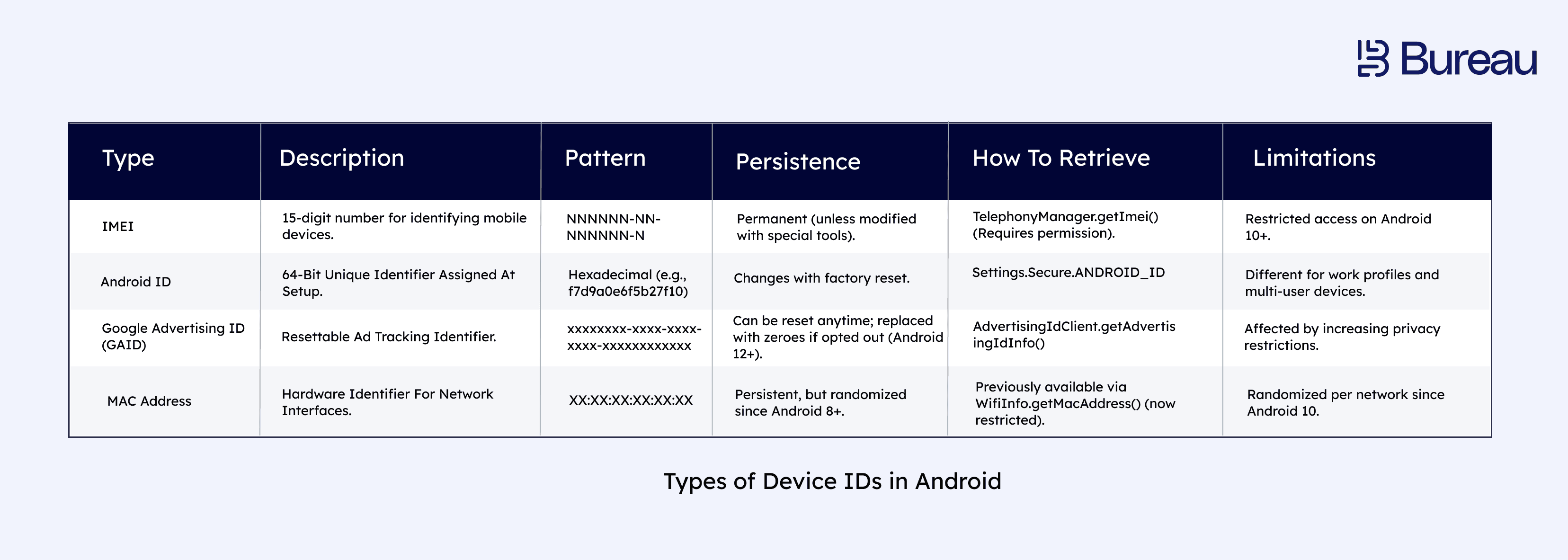
Device IDs for Android
Developers use different types of Device IDs that serve different purposes. Some are hardware-based and persistent, while others can be reset or changed over time. Below is a deep dive into key Android device IDs, characteristics, and patterns.
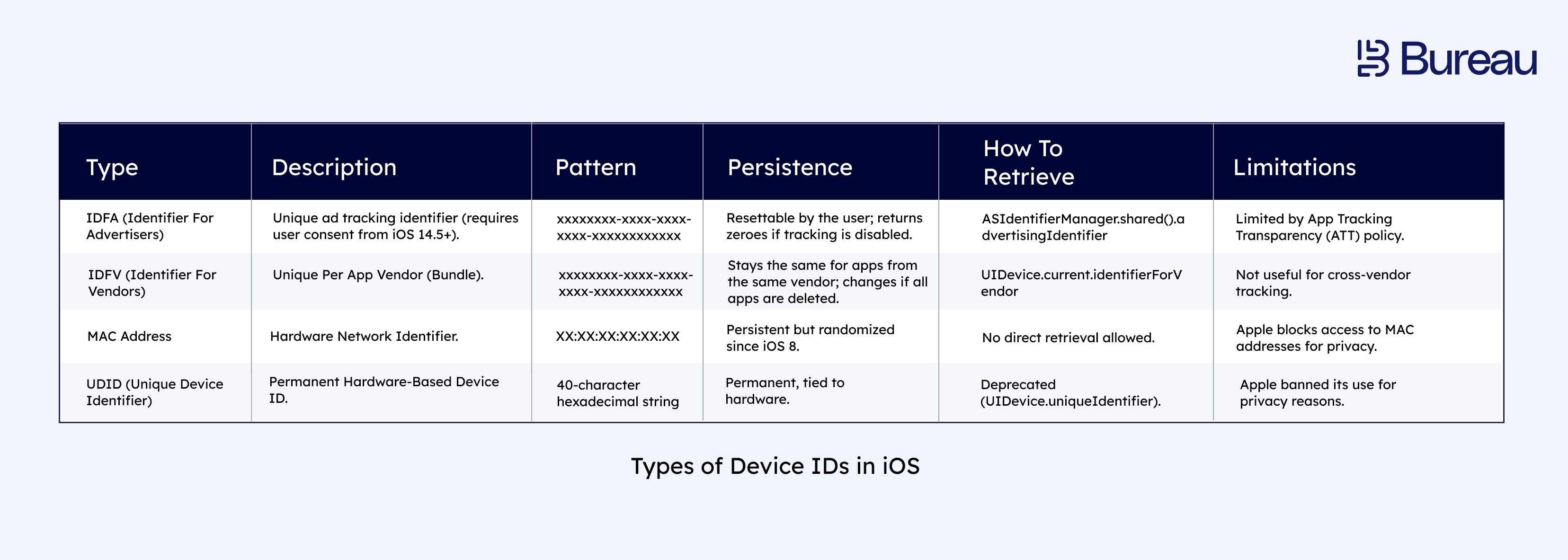
Device IDs for iOS
Apple has a stricter privacy policy regarding device identifiers. Below are the key identifiers used in iOS devices. Apple’s privacy-first approach limits tracking methods, making iOS identifiers harder to use for long-term tracking.
Other Types of Device IDs
IMEI: The International Mobile Equipment Identity is a 15-digit unique identification number for mobile phones. Telecom providers use this identifier to track and block fraudulent mobile devices.
Device Fingerprint: A composite identifier that comprises several device attributes such as browser, OS, screen size, plugins, etc, to uniquely identify and profile devices.
IP Address Combined with Device ID: Helps detect proxy or VPN use associated with fraudulent behavior by tracking the geolocation of a device.
Session or Token IDs: These are device-linked, temporary identifiers that help maintain session integrity and detect malicious activities like session hijacking.
Is Device ID the Same as IMEI, Android ID, or Advertising ID?
No, device ID is a broad term. IMEI is a hardware identifier for cellular devices, Android ID is an Android-specific software identifier, and advertising IDs are user-resettable identifiers used mainly for advertising and measurement.
In fraud prevention, businesses usually need a more resilient device identity layer that can work across resets, spoofing attempts, emulators, browsers, apps, and account changes.
Identifier | What It Is | Can It Change? | Best Suited for |
Fraud-Prevention Device ID | Risk-based identifier created from many signals | Designed to be more persistent | Fraud detection and device intelligence |
IMEI | Hardware identifier for mobile network devices | Usually stable, but access is restricted | Telecom and device-level use cases |
Android ID | Android-generated device, app, or user identifier | Can change after factory reset or signing-key changes | App-level identification |
Advertising ID | User-resettable ad identifier | Yes | Advertising and attribution |
IDFV | Apple vendor-specific identifier | Can change depending on app and vendor conditions | App ecosystem recognition |
The key difference is that most device identifiers were not built to detect fraud on their own. Fraud prevention needs device ID to work as part of a wider risk system that can recognize devices, compare behavior, detect manipulation, and turn those signals into action.
Related Read: Device Intelligence and Data Sovereignty: What You Need to Know
How Fraudsters Evade Device Identification
Fraudsters have found workarounds for most cyber defenses out there. Bypassing device identification and committing fraud in an undetected manner has become second nature. Here are a few of them.
Device Spoofing
Cybercriminals use emulators, virtual machines, or device manipulation tools to alter device attributes, making it appear as a different device. This helps them bypass anti-fraud measures that rely on static identifiers like IMEI or Android ID.
MAC Address Randomization
Since many anti-fraud systems rely on MAC addresses, fraudsters use tools to change or spoof their MAC addresses dynamically. This allows them to appear as a new device whenever they connect to a network.
IP & Location Masking
Cybercriminals can hide their actual IP addresses, making device-based geolocation tracking ineffective by using VPNs, location spoofing, proxy servers, or TOR networks.
User-Agent Manipulation
Fraudsters modify their browser’s user-agent string or manipulate fingerprinting attributes (e.g., screen resolution, fonts, WebGL settings) to appear as a legitimate but untraceable user.
Device ID Reset
Most developers use resettable IDs, like GAID (Google Advertising ID) or IDFA (Identifier for Advertisers), to track users. Fraudsters exploit this by frequently resetting these IDs to appear as a new user. Device ID reset is also widely used in app install fraud, where fraudsters reset the device ID to generate fake attributions and claim multiple sign-up promos or offers.
As fraudsters evolve their tactics, businesses need multi-layered fraud detection, combining device intelligence, behavioral analytics, and AI-driven risk assessment to stay ahead.
How Does Device ID Work in a Modern Fraud Prevention System?
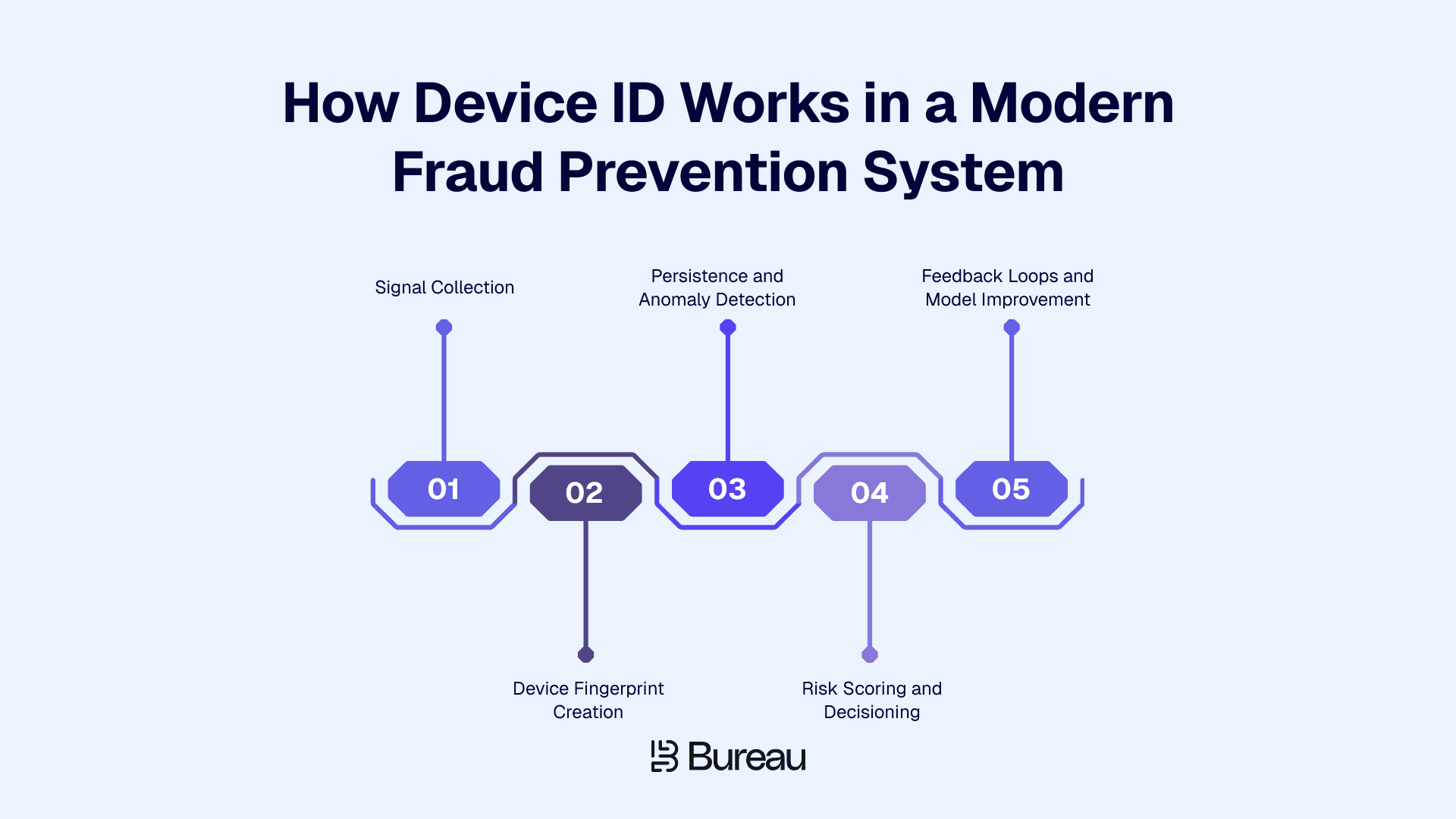
In fraud prevention, device ID works by connecting device, network, software, and behavioral signals to understand how much trust a business should place in a device during a specific interaction.
A basic identifier may tell you that a device exists. A modern device intelligence system goes further. It checks whether the device has appeared before, whether it behaves like a genuine user device, whether it is tied to suspicious activity, and whether it should trigger approval, review, or additional verification.
This helps fraud teams move from simple device recognition to contextual decisioning.
1. Signal Collection
The process starts with device and session-level signals. These may include device model, operating system, browser version, app version, IP address, VPN or proxy indicators, emulator signals, SDK tampering signs, hardware parameters, behavioral patterns, and account-device linkages.
These signals help fraud teams understand whether the device fits the user and session. For example, a familiar account logging in from a new device is not always risky, but a new device with proxy use, emulator behavior, and unusual interaction patterns may need closer review.
2. Device Fingerprint Creation
Once signals are collected, the system creates a device fingerprint. This fingerprint brings multiple attributes together, so the platform is not dependent on one identifier.
That matters because fraudsters can reset advertising IDs, clear cookies, reinstall apps, use private browsing, or change network settings. A device fingerprint gives fraud teams a broader view of the device environment, even when some individual signals change.
3. Persistence and Anomaly Detection
Fraudsters often try to make the same device look new. They may reset the device, change IP addresses, use emulators, reinstall apps, or hide behind VPNs and proxies.
A strong fraud-prevention device ID should help detect continuity across these changes and flag patterns such as:
Multiple accounts created from one device
A trusted account accessed from a risky new device
A blocked device returning with changed identifiers
A device showing emulator, spoofing, or automation behavior
A sudden mismatch between device, location, and user behavior
This is where device ID becomes useful for spotting repeat abuse that account-level checks may miss. It is also important for account takeover detection because valid credentials do not always mean a trusted user is behind the session.
In fact, Verizon’s 2025 Data Breach Investigation Report found that about 88% of breaches in the Basic Web Application Attacks pattern involved stolen credentials, which reinforces the need to evaluate device, session, and behavior signals together.
4. Risk Scoring and Decisioning
Device ID becomes valuable when it helps teams act quickly. A modern fraud system should convert device signals into decisions that fit the level of risk.
For example, a trusted device may move through without friction, a slightly unusual device may trigger step-up verification, and a device linked to repeated abuse may be blocked, restricted from promotions, or sent for manual review.
This helps fraud teams avoid blanket rules that slow down every user. Instead, they can apply friction only when device-level risk justifies it.
5. Feedback Loops and Model Improvement
Fraud patterns change constantly, so device intelligence cannot stay static. When a device is later confirmed to be linked to promo abuse, account takeover, mule activity, or bot behavior, that outcome should improve future risk decisions.
Bureau ID’s platform is positioned around self-learning models, configurable rules, and feedback loops, allowing risk teams to refine decisions as new fraud patterns emerge.
That said, device ID is not always something users can easily see or copy from settings. Where you find it depends on whether you mean an advertising ID, IMEI, app-generated ID, or fraud-prevention identifier.
Related Read: What Makes a Device ID Powerful? 5 Must-Have Features Explained
How to Find a Device ID?
Finding a device ID depends on the identifier you are looking for. Advertising IDs and IMEI numbers are usually visible in device settings, while app-generated or fraud-prevention device IDs are typically managed in the background by apps, SDKs, or fraud-prevention systems.
On iOS: Go to Settings > Privacy & Security > Tracking to manage which apps can request tracking permission and access IDFA-related settings.
On Android: Go to Settings > Privacy > Ads or Google Settings > Ads to view, reset, or manage your advertising ID. The exact path may vary by Android version and device manufacturer.
For IMEI: Go to Settings > About Phone on Android or Settings > General > About on iPhone.
For app-generated device IDs: These are usually created by the app or platform and may not be visible to users.
For fraud-prevention device IDs: These are typically generated by fraud-prevention systems using multiple device, network, and behavior signals. They are used for risk checks, not shown as a simple ID in user settings.
For fraud prevention, the most useful device ID is rarely just the visible advertising ID or IMEI. Businesses usually need a persistent, risk-based device identity that can keep working even when fraudsters reset, mask, or manipulate device signals.
Privacy Concerns Around Device ID Tracking
Because device identifiers can track users without their consent or knowledge, it has raised privacy, ethical, and legal concerns. The argument being that tracking device IDs can extend beyond content personalization or fraud prevention to user profiling, advertising, or, in worst cases, surveillance.
As a result, to protect users and ensure transparency in data collection, privacy regulations like the General Data Protection Regulation (GDPR) and the California Consumer Privacy Act (CCPA) mandate businesses to inform users when collecting device IDs and offer opt-out options, when possible. This allows for collecting legitimate interests, which in turn helps fraud prevention and security.
Furthermore, regulatory bodies are increasingly requiring member organizations to use device identification to punish bad actors. For instance, Control Requirements listed under Authentication (4.4(g)) in the Counter-Fraud Framework (CFF) by the Saudi Central Bank reads:
“Multi-factor authentication conducted by Member Organisations for identification or transaction verification should not solely consist of One Time Passwords (OTPs) sent via SMS. Member Organisations should implement additional factors, including but not limited to:
Approval of transactions through Mobile App (e.g., sending a push notification to a mobile app on a trusted device).
Device characteristics (e.g., trusted/known mobile device).
Geolocation (e.g., verifying location, IP address or checking mobile network).
Behavioural profile (e.g., variations to usual transaction volume, value, frequency, and/or currency).
Biometric behavioural profile (e.g., identification of changes in the way a customer or employee uses a browser or device).”
Device ID has emerged as an important component in fraud detection as it allows businesses to link user behavior with specific devices. Given growing privacy concerns, businesses are using advanced device fingerprinting and behavioral analytics to improve security without compromising user experience.
In a shift from unrestricted third-party tracking, Apple's iOS 14.5 update introduced the App Tracking Transparency (ATT) framework, requiring apps to obtain explicit user consent before accessing the IDFA. In the ATT framework, an app seeking to use the IDFA prompts the user for permission. If the user declines, the app cannot access the IDFA, limiting its ability to track user activity.
How Bureau ID’s Device ID Strengthens Fraud Prevention
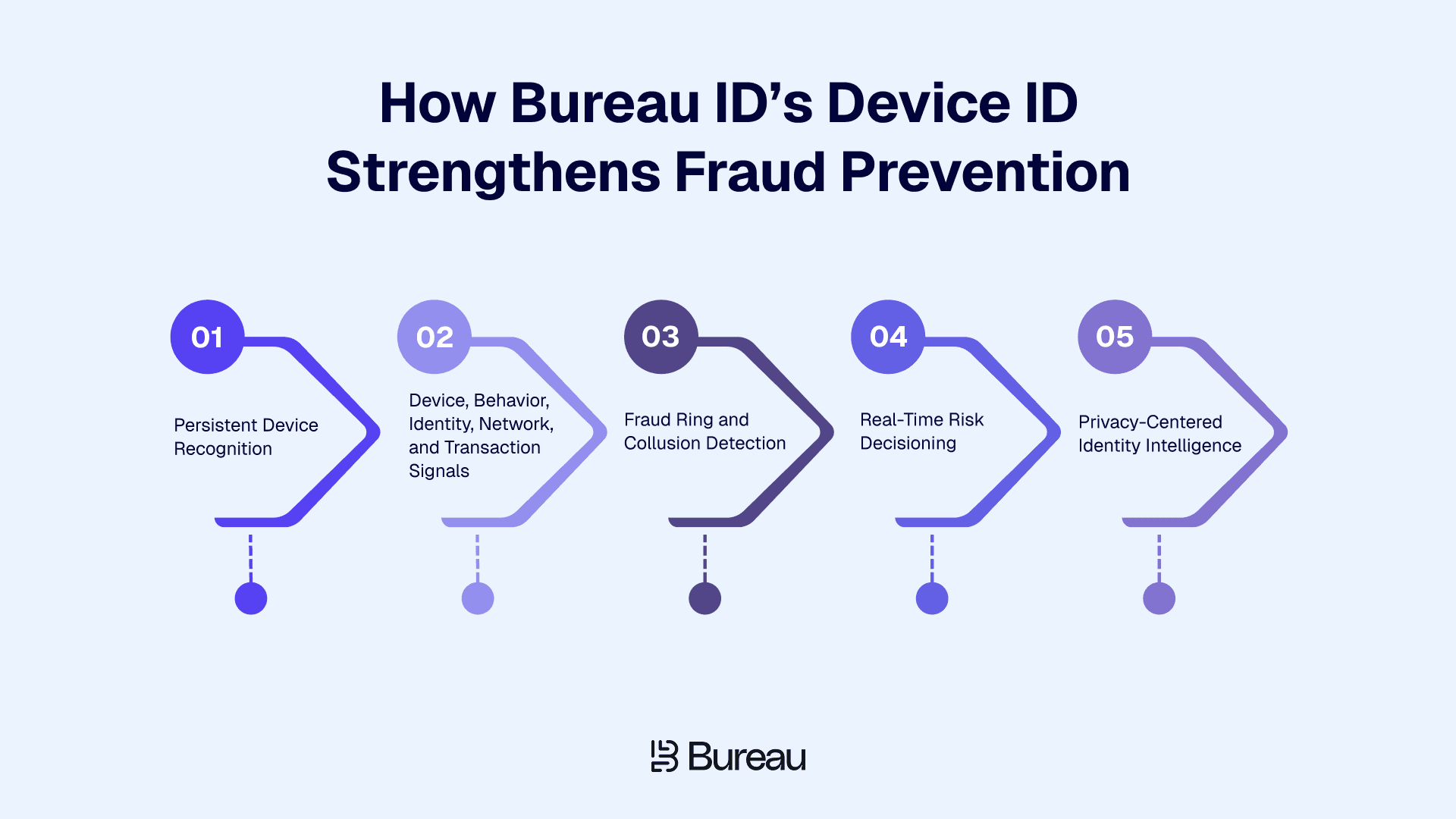
Bureau ID’s Device ID is built for businesses that need to recognize devices persistently, detect risky behavior, and connect device activity to broader fraud patterns.
Instead of treating device intelligence as a standalone check, it works within Bureau ID’s unified risk decisioning platform, where device, behavior, identity, network, and transaction signals come together to support real-time fraud decisions.
Persistent Device Recognition
Fraudsters often try to appear new by resetting devices, changing environments, using incognito mode, or manipulating device signals.
Bureau ID’s Device ID is designed to recognize devices across these evasion attempts, with 99.97% persistence that helps fraud teams identify returning devices even when bad actors try to hide past activity.
Device, Behavior, Identity, Network, and Transaction Signals
Device ID becomes more useful when it works with other risk signals. Bureau ID combines device intelligence with behavioral biometrics, identity data, network signals, and transaction context, giving fraud teams a clearer view of whether an interaction should be trusted.
This helps teams separate genuine returning users from risky users who may be using fresh credentials, masked IPs, or manipulated devices. It also supports more balanced decisions, where low-risk users can move forward with less friction while suspicious activity is reviewed, challenged, or blocked.
Fraud Ring and Collusion Detection
Fraud often looks harmless when each account is reviewed separately. The pattern becomes clearer when teams connect devices, accounts, phone numbers, emails, behaviors, and identities.
The platform’s Graph Identity Network helps map these relationships so teams can spot suspicious clusters that account-level checks may miss. This is useful for detecting fraud rings, money mule networks, promo abuse groups, and collusive behavior where multiple accounts are connected through shared devices or behavior patterns.
Real-Time Risk Decisioning
Bureau ID does more than identify a device by helping fraud teams act on device risk while the user is still in the flow.
Device signals can support decisions such as approval, rejection, step-up verification, manual review, promo restriction, or transaction limits. The platform also supports configurable no-code and low-code workflows, so risk teams can adjust rules, thresholds, and decision logic without waiting on engineering for every change.
Privacy-Centered Identity Intelligence
Device intelligence has to be handled carefully because businesses need fraud signals without creating unnecessary privacy risk. Bureau ID’s “decisions, not data” approach focuses on sharing risk scores and tokenized signals rather than raw consumer data across businesses.
That distinction matters because fraud prevention works best when trust, speed, and privacy are built into the same decisioning layer.
With persistent device recognition, graph intelligence, and real-time risk decisions working together, device ID becomes a practical way to stop repeat abuse without slowing down genuine users.
Turn Device Signals Into Action
By the time a pattern looks suspicious at the account level, the same device may have already created fake accounts, claimed promotions, triggered login risks, or moved through multiple sessions unnoticed. That is why device ID should help fraud teams decide whether that device can be trusted in the moment.
For businesses dealing with high-volume onboarding, logins, transactions, or promo abuse, the next step is to move from isolated device checks to connected device intelligence. That means combining device ID with behavior, identity, network, and transaction signals so teams can detect repeat abuse without slowing down genuine users.
Bureau ID helps businesses make that shift by bringing device intelligence into a unified risk decisioning layer. With Bureau ID, teams can:
Recognize returning devices
Detect repeat abuse faster
Connect devices to risk patterns
Reduce unnecessary friction
Act on risk in real time
Schedule a demo with Bureau ID to see how persistent device intelligence can help your team detect repeat fraud, reduce false positives, and make faster risk decisions.
FAQs
1. What is a device ID?
A device ID is a unique identifier that helps apps, websites, and fraud prevention systems recognize a device. It can identify a mobile phone, app installation, browser, or advertising profile depending on the context. Device IDs support login security, analytics, advertising, and fraud detection.
2. What is a device ID used for?
A device ID is used for app analytics, login security, advertising attribution, personalization, troubleshooting, and fraud prevention. Fraud teams use it to recognize returning devices, detect risky logins, identify fake accounts, and flag suspicious behavior across onboarding, transactions, and account access.
3. Is device ID the same as IMEI, Android ID, or advertising ID?
No. Device ID is a broad term. IMEI identifies cellular hardware, Android ID supports device or app identification, and advertising IDs support ad tracking and attribution. Advertising IDs are usually resettable, while IMEI is hardware-level and more restricted.
4. What is the difference between device ID and device fingerprint?
A device ID is usually one identifier. A device fingerprint combines multiple signals, such as device model, operating system, browser settings, IP, location, SIM, and behavior. Fraud systems use device fingerprinting when a single identifier is unavailable, reset, spoofed, or manipulated.
5. How does Bureau ID use device ID for fraud detection?
Bureau ID uses device ID as part of a broader device intelligence system. It combines persistent device recognition with behavior, identity, network, and transaction signals to detect risky devices, fake accounts, emulator use, fraud rings, and account takeover attempts in real time.
6. Can a device ID be changed?
Yes, some device identifiers can change. Advertising IDs can be reset or deleted by users, and some identifiers may change after reinstalling an app, resetting a device, updating the operating system, or changing privacy settings. Fraudsters may also try to spoof, mask, or manipulate device identifiers.
Fraudsters do not always need a new identity to bypass checks; sometimes, they only need to make the same device look new.
For digital businesses, this creates a blind spot because emails, phone numbers, IP addresses, and credentials can be changed, masked, or stolen. When these signals fail, device ID gives fraud teams another way to recognize repeat activity.
This matters across onboarding, login, transactions, promo abuse detection, bot prevention, and account takeover protection, where the same device can quietly appear behind different accounts or sessions.
In this guide, we’ll explain what a device ID is, how it differs from identifiers like IMEI, Android ID, and advertising ID, how to find certain device IDs, and how device IDs work in fraud prevention. We’ll also look at how device intelligence helps businesses detect repeat abuse, reduce false positives, and make better risk decisions without slowing down genuine users.
What Is a Device ID?
A Device ID is a unique identifier that helps apps, websites, and fraud prevention systems recognize a device. It can support login security, account protection, advertising, analytics, and device-level risk checks.
Fraud teams use Device ID with device fingerprinting, IP, location, behavior, SIM, and transaction signals to detect spoofed devices, fake accounts, account takeover, emulator use, and repeat fraud attempts. A Device ID is useful, but it works best as part of a broader device intelligence system.
Device ID can mean different things based on the use case. It may refer to:
A mobile operating system identifier, such as Android ID or Apple’s vendor-specific identifier
An advertising identifier used for attribution, measurement, or personalization
An app-specific identifier created by a platform to recognize a device
A device fingerprint built from hardware, software, browser, network, and behavior signals
A fraud-prevention identifier used to detect risky, spoofed, or repeat devices
For fraud teams, the value of device ID is not just recognition. It helps identify whether a device has appeared before, whether it is linked to multiple accounts, and whether it shows signs of manipulation or repeated abuse.
What Is a Device ID Used for?
Device IDs are used to recognize devices across digital interactions. Apps, platforms, advertisers, analytics tools, authentication systems, and fraud-prevention teams may use device identifiers to understand whether a device is new, known, trusted, restricted, or suspicious.
In everyday app usage, device identifiers may support analytics, personalization, attribution, login security, and app functionality. For fraud teams, device ID goes further by helping identify patterns that may not be visible from account information alone.
A device ID can help teams:
Recognize genuine users when they return from a known device.
Detect multi-accounting when one device creates or operates many accounts.
Prevent promo abuse across referral rewards, sign-up bonuses, discounts, and cashback offers.
Strengthen account takeover detection when credentials are correct, but the device looks unfamiliar.
Detect bot, emulator, VPN, TOR, or spoofing behavior.
Connect fraud rings by linking accounts, devices, behaviors, and identifiers.
Reduce false positives by recognizing trusted users faster.
This is especially relevant for merchants dealing with repeat policy abuse. The Merchant Risk Council’s 2026 Global Payments and Fraud Report found that 57% of merchants reported an increase in refund or policy abuse over the past year, which makes device-level linking useful for spotting repeat behavior across accounts.
This is why enterprise fraud platforms increasingly combine device signals with behavior, identity, network, and transaction data. Bureau ID’s unified risk decisioning platform follows this model by combining these signals to support real-time decisions across onboarding, authentication, and transaction monitoring.
Types of Device IDs
Depending on the platform and specific functions, there are several types of Device IDs.
Device IDs for Android
Developers use different types of Device IDs that serve different purposes. Some are hardware-based and persistent, while others can be reset or changed over time. Below is a deep dive into key Android device IDs, characteristics, and patterns.
Device IDs for iOS
Apple has a stricter privacy policy regarding device identifiers. Below are the key identifiers used in iOS devices. Apple’s privacy-first approach limits tracking methods, making iOS identifiers harder to use for long-term tracking.
Other Types of Device IDs
IMEI: The International Mobile Equipment Identity is a 15-digit unique identification number for mobile phones. Telecom providers use this identifier to track and block fraudulent mobile devices.
Device Fingerprint: A composite identifier that comprises several device attributes such as browser, OS, screen size, plugins, etc, to uniquely identify and profile devices.
IP Address Combined with Device ID: Helps detect proxy or VPN use associated with fraudulent behavior by tracking the geolocation of a device.
Session or Token IDs: These are device-linked, temporary identifiers that help maintain session integrity and detect malicious activities like session hijacking.
Is Device ID the Same as IMEI, Android ID, or Advertising ID?
No, device ID is a broad term. IMEI is a hardware identifier for cellular devices, Android ID is an Android-specific software identifier, and advertising IDs are user-resettable identifiers used mainly for advertising and measurement.
In fraud prevention, businesses usually need a more resilient device identity layer that can work across resets, spoofing attempts, emulators, browsers, apps, and account changes.
Identifier | What It Is | Can It Change? | Best Suited for |
Fraud-Prevention Device ID | Risk-based identifier created from many signals | Designed to be more persistent | Fraud detection and device intelligence |
IMEI | Hardware identifier for mobile network devices | Usually stable, but access is restricted | Telecom and device-level use cases |
Android ID | Android-generated device, app, or user identifier | Can change after factory reset or signing-key changes | App-level identification |
Advertising ID | User-resettable ad identifier | Yes | Advertising and attribution |
IDFV | Apple vendor-specific identifier | Can change depending on app and vendor conditions | App ecosystem recognition |
The key difference is that most device identifiers were not built to detect fraud on their own. Fraud prevention needs device ID to work as part of a wider risk system that can recognize devices, compare behavior, detect manipulation, and turn those signals into action.
Related Read: Device Intelligence and Data Sovereignty: What You Need to Know
How Fraudsters Evade Device Identification
Fraudsters have found workarounds for most cyber defenses out there. Bypassing device identification and committing fraud in an undetected manner has become second nature. Here are a few of them.
Device Spoofing
Cybercriminals use emulators, virtual machines, or device manipulation tools to alter device attributes, making it appear as a different device. This helps them bypass anti-fraud measures that rely on static identifiers like IMEI or Android ID.
MAC Address Randomization
Since many anti-fraud systems rely on MAC addresses, fraudsters use tools to change or spoof their MAC addresses dynamically. This allows them to appear as a new device whenever they connect to a network.
IP & Location Masking
Cybercriminals can hide their actual IP addresses, making device-based geolocation tracking ineffective by using VPNs, location spoofing, proxy servers, or TOR networks.
User-Agent Manipulation
Fraudsters modify their browser’s user-agent string or manipulate fingerprinting attributes (e.g., screen resolution, fonts, WebGL settings) to appear as a legitimate but untraceable user.
Device ID Reset
Most developers use resettable IDs, like GAID (Google Advertising ID) or IDFA (Identifier for Advertisers), to track users. Fraudsters exploit this by frequently resetting these IDs to appear as a new user. Device ID reset is also widely used in app install fraud, where fraudsters reset the device ID to generate fake attributions and claim multiple sign-up promos or offers.
As fraudsters evolve their tactics, businesses need multi-layered fraud detection, combining device intelligence, behavioral analytics, and AI-driven risk assessment to stay ahead.
How Does Device ID Work in a Modern Fraud Prevention System?
In fraud prevention, device ID works by connecting device, network, software, and behavioral signals to understand how much trust a business should place in a device during a specific interaction.
A basic identifier may tell you that a device exists. A modern device intelligence system goes further. It checks whether the device has appeared before, whether it behaves like a genuine user device, whether it is tied to suspicious activity, and whether it should trigger approval, review, or additional verification.
This helps fraud teams move from simple device recognition to contextual decisioning.
1. Signal Collection
The process starts with device and session-level signals. These may include device model, operating system, browser version, app version, IP address, VPN or proxy indicators, emulator signals, SDK tampering signs, hardware parameters, behavioral patterns, and account-device linkages.
These signals help fraud teams understand whether the device fits the user and session. For example, a familiar account logging in from a new device is not always risky, but a new device with proxy use, emulator behavior, and unusual interaction patterns may need closer review.
2. Device Fingerprint Creation
Once signals are collected, the system creates a device fingerprint. This fingerprint brings multiple attributes together, so the platform is not dependent on one identifier.
That matters because fraudsters can reset advertising IDs, clear cookies, reinstall apps, use private browsing, or change network settings. A device fingerprint gives fraud teams a broader view of the device environment, even when some individual signals change.
3. Persistence and Anomaly Detection
Fraudsters often try to make the same device look new. They may reset the device, change IP addresses, use emulators, reinstall apps, or hide behind VPNs and proxies.
A strong fraud-prevention device ID should help detect continuity across these changes and flag patterns such as:
Multiple accounts created from one device
A trusted account accessed from a risky new device
A blocked device returning with changed identifiers
A device showing emulator, spoofing, or automation behavior
A sudden mismatch between device, location, and user behavior
This is where device ID becomes useful for spotting repeat abuse that account-level checks may miss. It is also important for account takeover detection because valid credentials do not always mean a trusted user is behind the session.
In fact, Verizon’s 2025 Data Breach Investigation Report found that about 88% of breaches in the Basic Web Application Attacks pattern involved stolen credentials, which reinforces the need to evaluate device, session, and behavior signals together.
4. Risk Scoring and Decisioning
Device ID becomes valuable when it helps teams act quickly. A modern fraud system should convert device signals into decisions that fit the level of risk.
For example, a trusted device may move through without friction, a slightly unusual device may trigger step-up verification, and a device linked to repeated abuse may be blocked, restricted from promotions, or sent for manual review.
This helps fraud teams avoid blanket rules that slow down every user. Instead, they can apply friction only when device-level risk justifies it.
5. Feedback Loops and Model Improvement
Fraud patterns change constantly, so device intelligence cannot stay static. When a device is later confirmed to be linked to promo abuse, account takeover, mule activity, or bot behavior, that outcome should improve future risk decisions.
Bureau ID’s platform is positioned around self-learning models, configurable rules, and feedback loops, allowing risk teams to refine decisions as new fraud patterns emerge.
That said, device ID is not always something users can easily see or copy from settings. Where you find it depends on whether you mean an advertising ID, IMEI, app-generated ID, or fraud-prevention identifier.
Related Read: What Makes a Device ID Powerful? 5 Must-Have Features Explained
How to Find a Device ID?
Finding a device ID depends on the identifier you are looking for. Advertising IDs and IMEI numbers are usually visible in device settings, while app-generated or fraud-prevention device IDs are typically managed in the background by apps, SDKs, or fraud-prevention systems.
On iOS: Go to Settings > Privacy & Security > Tracking to manage which apps can request tracking permission and access IDFA-related settings.
On Android: Go to Settings > Privacy > Ads or Google Settings > Ads to view, reset, or manage your advertising ID. The exact path may vary by Android version and device manufacturer.
For IMEI: Go to Settings > About Phone on Android or Settings > General > About on iPhone.
For app-generated device IDs: These are usually created by the app or platform and may not be visible to users.
For fraud-prevention device IDs: These are typically generated by fraud-prevention systems using multiple device, network, and behavior signals. They are used for risk checks, not shown as a simple ID in user settings.
For fraud prevention, the most useful device ID is rarely just the visible advertising ID or IMEI. Businesses usually need a persistent, risk-based device identity that can keep working even when fraudsters reset, mask, or manipulate device signals.
Privacy Concerns Around Device ID Tracking
Because device identifiers can track users without their consent or knowledge, it has raised privacy, ethical, and legal concerns. The argument being that tracking device IDs can extend beyond content personalization or fraud prevention to user profiling, advertising, or, in worst cases, surveillance.
As a result, to protect users and ensure transparency in data collection, privacy regulations like the General Data Protection Regulation (GDPR) and the California Consumer Privacy Act (CCPA) mandate businesses to inform users when collecting device IDs and offer opt-out options, when possible. This allows for collecting legitimate interests, which in turn helps fraud prevention and security.
Furthermore, regulatory bodies are increasingly requiring member organizations to use device identification to punish bad actors. For instance, Control Requirements listed under Authentication (4.4(g)) in the Counter-Fraud Framework (CFF) by the Saudi Central Bank reads:
“Multi-factor authentication conducted by Member Organisations for identification or transaction verification should not solely consist of One Time Passwords (OTPs) sent via SMS. Member Organisations should implement additional factors, including but not limited to:
Approval of transactions through Mobile App (e.g., sending a push notification to a mobile app on a trusted device).
Device characteristics (e.g., trusted/known mobile device).
Geolocation (e.g., verifying location, IP address or checking mobile network).
Behavioural profile (e.g., variations to usual transaction volume, value, frequency, and/or currency).
Biometric behavioural profile (e.g., identification of changes in the way a customer or employee uses a browser or device).”
Device ID has emerged as an important component in fraud detection as it allows businesses to link user behavior with specific devices. Given growing privacy concerns, businesses are using advanced device fingerprinting and behavioral analytics to improve security without compromising user experience.
In a shift from unrestricted third-party tracking, Apple's iOS 14.5 update introduced the App Tracking Transparency (ATT) framework, requiring apps to obtain explicit user consent before accessing the IDFA. In the ATT framework, an app seeking to use the IDFA prompts the user for permission. If the user declines, the app cannot access the IDFA, limiting its ability to track user activity.
How Bureau ID’s Device ID Strengthens Fraud Prevention
Bureau ID’s Device ID is built for businesses that need to recognize devices persistently, detect risky behavior, and connect device activity to broader fraud patterns.
Instead of treating device intelligence as a standalone check, it works within Bureau ID’s unified risk decisioning platform, where device, behavior, identity, network, and transaction signals come together to support real-time fraud decisions.
Persistent Device Recognition
Fraudsters often try to appear new by resetting devices, changing environments, using incognito mode, or manipulating device signals.
Bureau ID’s Device ID is designed to recognize devices across these evasion attempts, with 99.97% persistence that helps fraud teams identify returning devices even when bad actors try to hide past activity.
Device, Behavior, Identity, Network, and Transaction Signals
Device ID becomes more useful when it works with other risk signals. Bureau ID combines device intelligence with behavioral biometrics, identity data, network signals, and transaction context, giving fraud teams a clearer view of whether an interaction should be trusted.
This helps teams separate genuine returning users from risky users who may be using fresh credentials, masked IPs, or manipulated devices. It also supports more balanced decisions, where low-risk users can move forward with less friction while suspicious activity is reviewed, challenged, or blocked.
Fraud Ring and Collusion Detection
Fraud often looks harmless when each account is reviewed separately. The pattern becomes clearer when teams connect devices, accounts, phone numbers, emails, behaviors, and identities.
The platform’s Graph Identity Network helps map these relationships so teams can spot suspicious clusters that account-level checks may miss. This is useful for detecting fraud rings, money mule networks, promo abuse groups, and collusive behavior where multiple accounts are connected through shared devices or behavior patterns.
Real-Time Risk Decisioning
Bureau ID does more than identify a device by helping fraud teams act on device risk while the user is still in the flow.
Device signals can support decisions such as approval, rejection, step-up verification, manual review, promo restriction, or transaction limits. The platform also supports configurable no-code and low-code workflows, so risk teams can adjust rules, thresholds, and decision logic without waiting on engineering for every change.
Privacy-Centered Identity Intelligence
Device intelligence has to be handled carefully because businesses need fraud signals without creating unnecessary privacy risk. Bureau ID’s “decisions, not data” approach focuses on sharing risk scores and tokenized signals rather than raw consumer data across businesses.
That distinction matters because fraud prevention works best when trust, speed, and privacy are built into the same decisioning layer.
With persistent device recognition, graph intelligence, and real-time risk decisions working together, device ID becomes a practical way to stop repeat abuse without slowing down genuine users.
Turn Device Signals Into Action
By the time a pattern looks suspicious at the account level, the same device may have already created fake accounts, claimed promotions, triggered login risks, or moved through multiple sessions unnoticed. That is why device ID should help fraud teams decide whether that device can be trusted in the moment.
For businesses dealing with high-volume onboarding, logins, transactions, or promo abuse, the next step is to move from isolated device checks to connected device intelligence. That means combining device ID with behavior, identity, network, and transaction signals so teams can detect repeat abuse without slowing down genuine users.
Bureau ID helps businesses make that shift by bringing device intelligence into a unified risk decisioning layer. With Bureau ID, teams can:
Recognize returning devices
Detect repeat abuse faster
Connect devices to risk patterns
Reduce unnecessary friction
Act on risk in real time
Schedule a demo with Bureau ID to see how persistent device intelligence can help your team detect repeat fraud, reduce false positives, and make faster risk decisions.
FAQs
1. What is a device ID?
A device ID is a unique identifier that helps apps, websites, and fraud prevention systems recognize a device. It can identify a mobile phone, app installation, browser, or advertising profile depending on the context. Device IDs support login security, analytics, advertising, and fraud detection.
2. What is a device ID used for?
A device ID is used for app analytics, login security, advertising attribution, personalization, troubleshooting, and fraud prevention. Fraud teams use it to recognize returning devices, detect risky logins, identify fake accounts, and flag suspicious behavior across onboarding, transactions, and account access.
3. Is device ID the same as IMEI, Android ID, or advertising ID?
No. Device ID is a broad term. IMEI identifies cellular hardware, Android ID supports device or app identification, and advertising IDs support ad tracking and attribution. Advertising IDs are usually resettable, while IMEI is hardware-level and more restricted.
4. What is the difference between device ID and device fingerprint?
A device ID is usually one identifier. A device fingerprint combines multiple signals, such as device model, operating system, browser settings, IP, location, SIM, and behavior. Fraud systems use device fingerprinting when a single identifier is unavailable, reset, spoofed, or manipulated.
5. How does Bureau ID use device ID for fraud detection?
Bureau ID uses device ID as part of a broader device intelligence system. It combines persistent device recognition with behavior, identity, network, and transaction signals to detect risky devices, fake accounts, emulator use, fraud rings, and account takeover attempts in real time.
6. Can a device ID be changed?
Yes, some device identifiers can change. Advertising IDs can be reset or deleted by users, and some identifiers may change after reinstalling an app, resetting a device, updating the operating system, or changing privacy settings. Fraudsters may also try to spoof, mask, or manipulate device identifiers.
TABLE OF CONTENTS
See More
Recommended Blogs


Landing Page.
Simple, bold.
Sign Up
Download

Products
Solutions


© 2026 Bureau . All rights reserved.
Solutions
Industries
Resources
Company
Solutions
Industries
Resources
Company
© 2026 Bureau . All rights reserved.
Follow Us
Leave behind fragmented tools. Stop fraud rings, cut false declines, and deliver secure digital journeys at scale
Our Presence








Leave behind fragmented tools. Stop fraud rings, cut false declines, and deliver secure digital journeys at scale
Our Presence
© 2026 Bureau . All rights reserved.